HTB Academy - Create user
HTB Academy - Create user: New-ADUser -Name "Orion Starchaser" -Accountpassword (ConvertTo-SecureString -AsPlainText (Read-Host "Enter a secure password") -Force ) -Enabled $true -OtherAttributes @{'title'="Analyst";'mail'="o.starchaser@inlanefreight.local"} • HTB Academy • htb-academy, module74
Create an user from powershell:New-ADUser -Name "Orion Starchaser" -Accountpassword (ConvertTo-SecureString -AsPlainText (Read-Host "Enter a secure password") -Force ) -Enabled $true -OtherAttributes @{'title'="Analyst";'mail'="o.starchaser@inlanefreight.local"}
PS C:\htb> New-ADUser -Name "Orion Starchaser" -Accountpassword (ConvertTo-SecureString -AsPlainText (Read-Host "Enter a secure password") -Force ) -Enabled $true -OtherAttributes @{'title'="Analyst";'mail'="o.starchaser@inlanefreight.local"}
You could either do it from the GUI as well
```json
[](http://www.xsisec.com/screenshots/screenshot-20221003-035912.png)
```sql
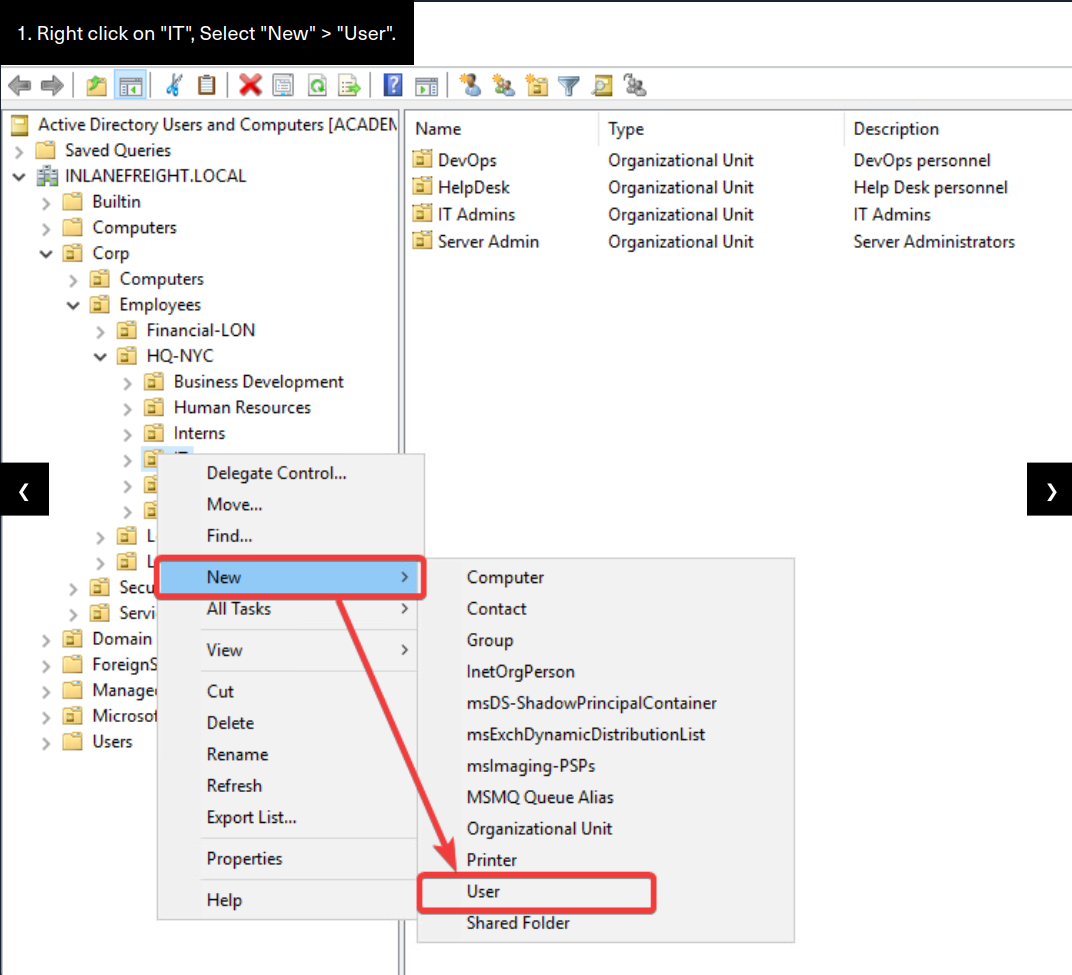
- Right-click on "IT" > Select "New" > "User". A popup window will appear with a field for you to fill in.- Add the user's First and Last name, set the "User Logon Name:" as
acepheus, and then hit Next.
- Now supply the new user with a password of `NewP@ssw0rd123!`, confirm the password again, and check the box for " User must change password at next login", then hit next. Select "Finish" in the last window if all attributes look correct.
PowerShell to Remove a User
PS C:\htb> Remove-ADUser -Identity pvalencia
#### Remove a User from the MMC Snap-in
Now we will remove a user `Paul Valencia` from our domain. We can do so by: - The most straightforward method from the ADUC snap-in will be to use the `find` functionality. Inlanefreight has many users across several OU's. To use find:
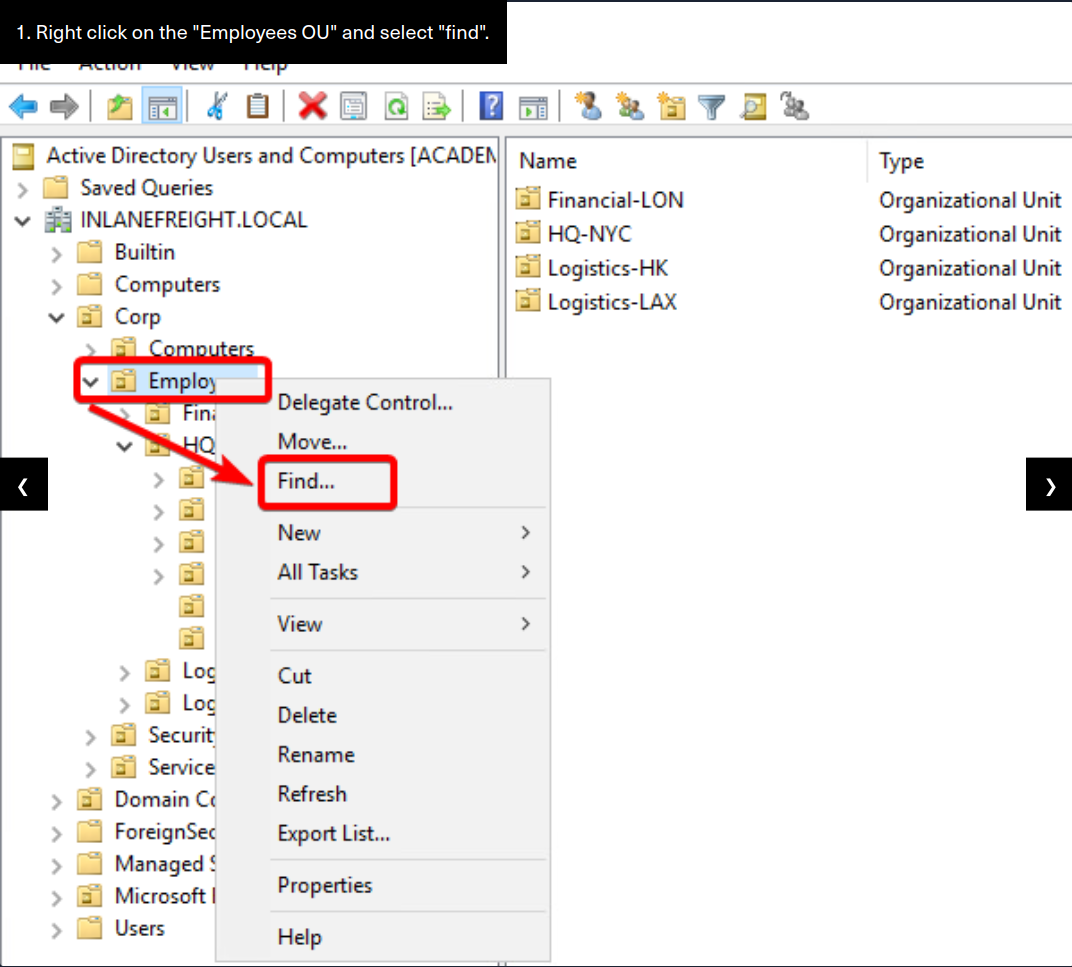
- Right-click on `Employees` and select "find".- Type in the username you wish to search for, in this case, "Paul Valencia" and hit "Find Now." If a user has that name, the search results will appear lower in the find window.
- Now, right-click on the user and select delete. A popup window will appear to confirm the deletion of the user. Hit yes.- To validate the user is deleted, you can use the
Findfeature again to search for the user.
Deleting a User via the GUI
To delete a user via the GUI, we will use the ADUC snap-in just like when we added a user to the domain above.
```json
[](http://www.xsisec.com/screenshots/screenshot-20221003-040057.png)
#### PowerShell To Unlock a User
```html
PS C:\htb> Unlock-ADAccount -Identity amastersWe also need to set a new password for the user and force them to change the password at the next logon. We will do this with the SetADAccountPassword and Set-ADUser cmdlets.
Reset User Password (Set-ADAccountPassword)
PS C:\htb> Set-ADAccountPassword -Identity 'amasters' -Reset -NewPassword (ConvertTo-SecureString -AsPlainText "NewP@ssw0rdReset!" -Force)
Force Password Change (Set-ADUser)
PS C:\htb> Set-ADUser -Identity amasters -ChangePasswordAtLogon $true#### Unlock from Snap-inUnlocking this user account will take several steps. The first is to unlock the account, then we set it so that the user must change his password at the next login, and then we reset his password to a temporary one so that he can log in and reset it himself. We can do so by:
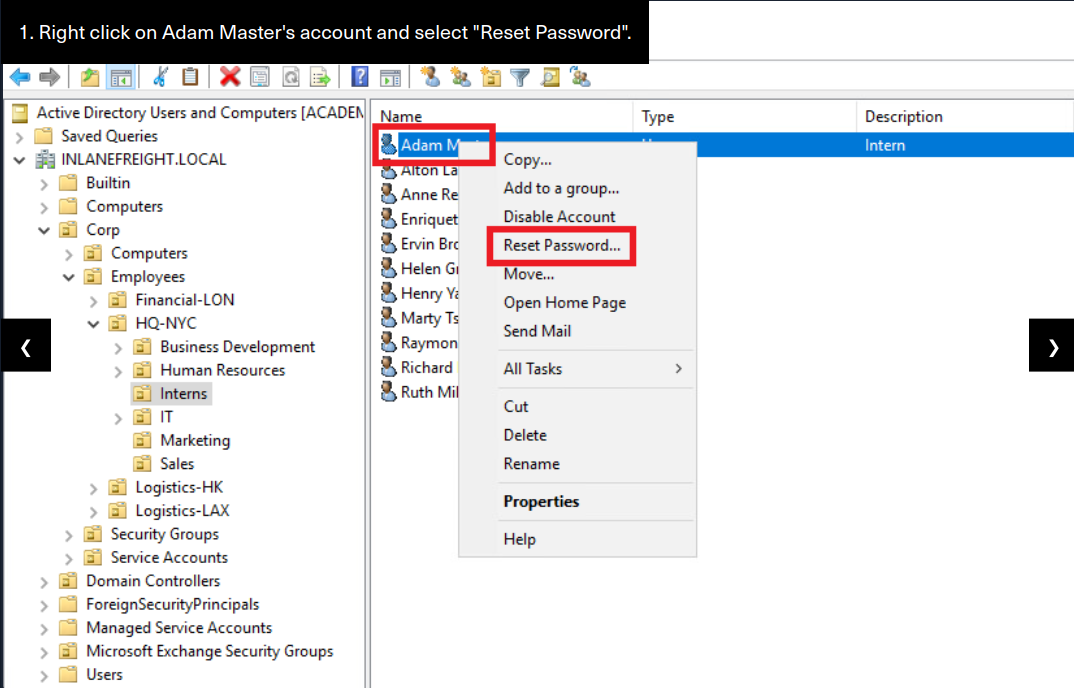
- right-click on the user and select `Reset Password`.- In the next window, type in the temporary password, confirm it, and check the boxes for "User must change password at next logon" and "Unlock the user's account."
- Once done, hit OK to apply changes. If no error occurs, you will get a prompt informing you that the user's password was changed.
#### Unlock Users Account From GUITo unlock Adam Masters' account, we will use the ADUC snap-in just like when we added a user to the domain above.
#### Create a New AD OU and Security Group from PowerShellTo create a new OU and Group, we can perform the following actions:
PS C:\htb> New-ADOrganizationalUnit -Name "Security Analysts" -Path "OU=IT,OU=HQ-NYC,OU=Employees,OU=CORP,DC=INLANEFREIGHT,DC=LOCAL""First, we created the new OU to hold our Analysts and their resources. Next, we need to create a security group for these users.
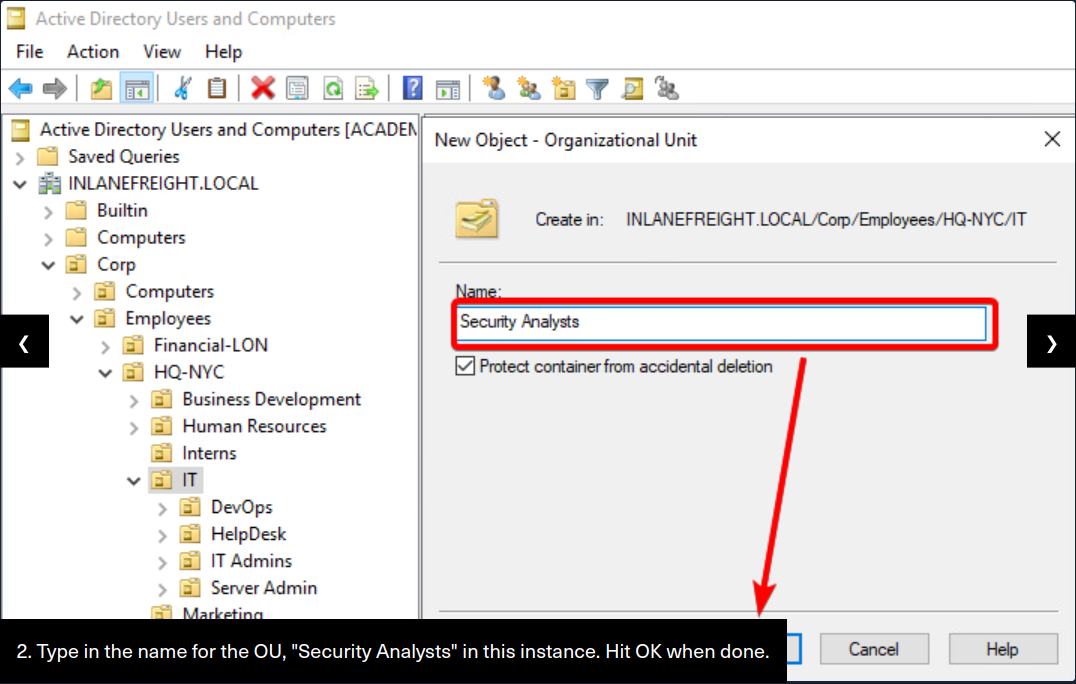
Create a New AD OU and Security Group from PowerShell PS C:\htb> New-ADGroup -Name "Security Analysts" -SamAccountName analysts -GroupCategory Security -GroupScope Global -DisplayName "Security Analysts" -Path "OU=Security Analysts,OU=IT,OU=HQ-NYC,OU=Employees,OU=Corp,DC=INLANEFREIGHT,DC=LOCAL" -Description "Members of this group are Security Analysts under the IT OU" #### From MMC Snap-inThis will be a quick two-step process for us. We first need to create a new OU to host our Security Analysts. To do so, we will :
- navigate to the "Corp > Employees > HQ-NYC > IT "OU. We are going to build out a new container within
IT.
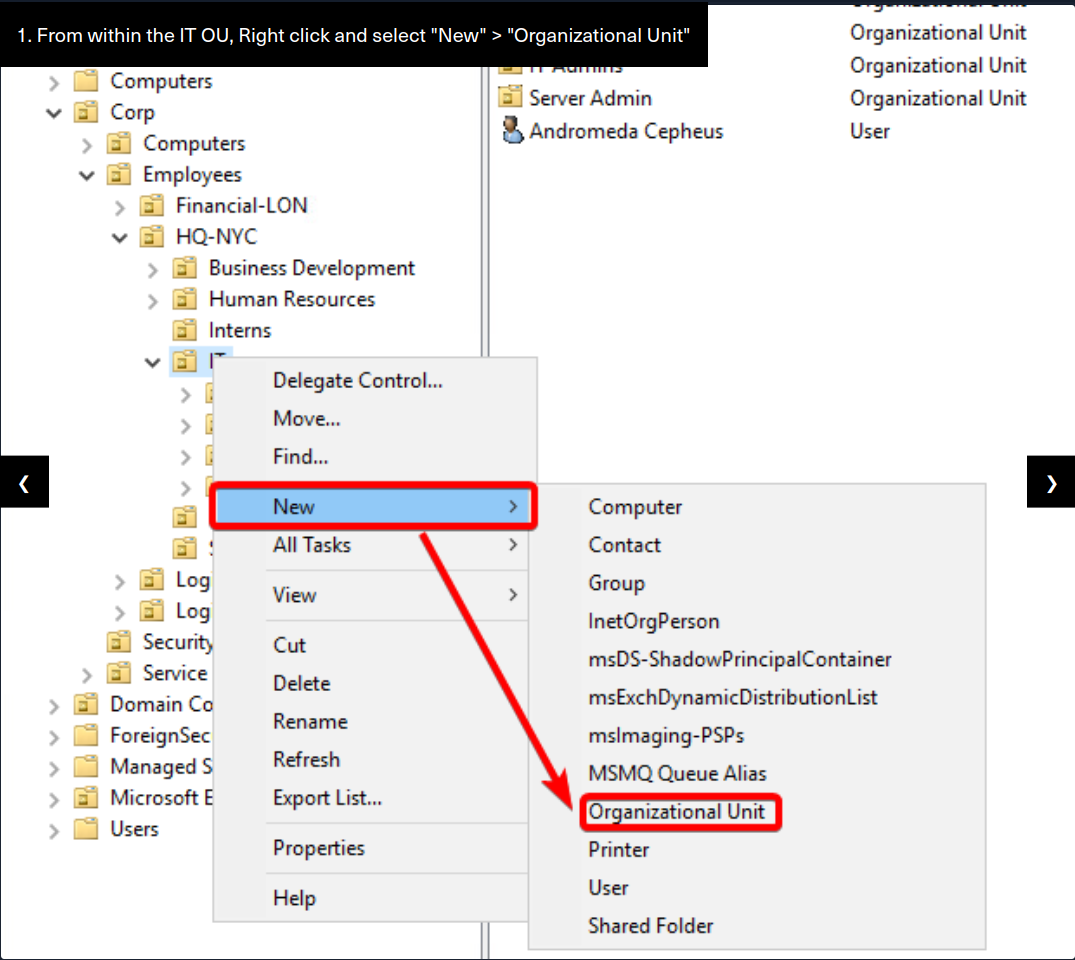
- Right-click on `IT` and select "New > Organizational Unit". A new window should appear. - input the name
Security Analystsinto the Name field and leave the default option set for the Protect checkbox. Hit OK, and the OU should be created.
Create A New OU Under I.T.
Our new OU "Security Analysts" should exist in the IT hive.
Add User to Group via PowerShell
PS C:\htb> Add-ADGroupMember -Identity analysts -Members ACepheus,OStarchaser,ACallistoDuplicate the Object via PowerShell
PS C:\htb> Copy-GPO -SourceName "Logon Banner" -TargetName "Security Analysts Control"The command above will take Logon Banner GPO and copy it to a new object named Security Analyst Control. This object will have all the old attributes of the Logon Banner GPO, but it will not be applied to anything until we link it.
Link the New GPO to an OU
PS C:\htb> Set-GPLink -Name "Security Analysts Control" -Target "ou=Security Analysts,ou=IT,OU=HQ-NYC,OU=Employees,OU=Corp,dc=INLANEFREIGHT,dc=LOCAL" -LinkEnabled YesComments
Comments
Loading comments…