HTB Academy - Fundamentals - File Descriptors and Redirections
HTB Academy - Fundamentals - File Descriptors and Redirections: File Descriptors A file descriptor (FD) in Unix/Linux operating systems is an indicator of connection maintained by the kernel to perform Input/Output (I/O) operations. In Windows-based operating systems, it is called filehandle. It is the connection (generally to a file) from the Operating system to perform I/O operations (Input/Output of... • HTB Academy • STDIN, STDOUT
File Descriptors
A file descriptor (FD) in Unix/Linux operating systems is a connection maintained by the kernel to perform input/output (I/O) operations.
In Windows-based operating systems, this is commonly called a file handle.
By default, the first three file descriptors in Linux are:
| File Descriptor | Stream | Description |
|---|---|---|
0 | STDIN | Standard input |
1 | STDOUT | Standard output |
2 | STDERR | Standard error output |
STDIN and STDOUT
The cat command provides a simple example of how standard input and standard output work.
When running cat, the program receives input through standard input:
STDIN - FD 0After entering text and pressing [ENTER], the input is returned to the terminal through standard output:
STDOUT - FD 1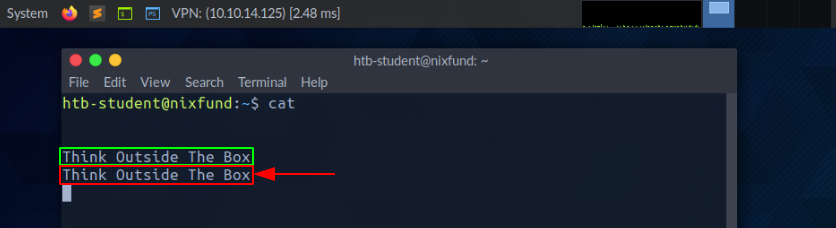
In simple terms:
STDIN - FD 0is input.STDOUT - FD 1is output.STDERR - FD 2is error output.
STDOUT and STDERR
The find command can produce both standard output and standard error output.
Run the following command:
find /etc/ -name shadow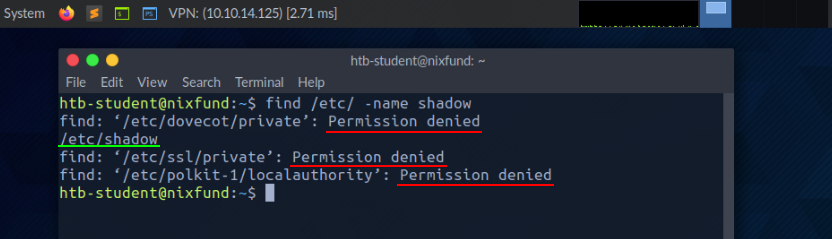
Valid results are returned through STDOUT, while errors such as Permission denied are returned through STDERR.
Redirect STDERR to /dev/null
We can redirect standard errors to /dev/null using file descriptor 2:
find /etc/ -name shadow 2>/dev/null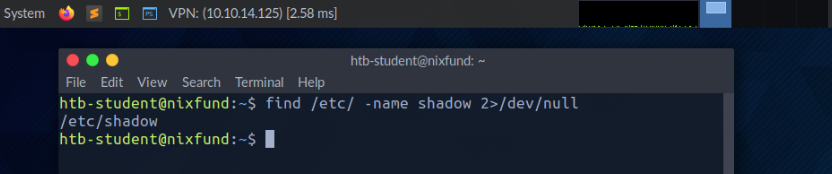
The following part performs the redirection:
2>/dev/null2representsSTDERR.>redirects the stream./dev/nulldiscards anything written to it.
After redirecting STDERR, errors such as Permission denied are no longer displayed. Only standard output remains visible.
Redirect STDOUT to a File
Standard output can be redirected to a file using the greater-than operator:
find /etc/ -name shadow 2>/dev/null > results.txt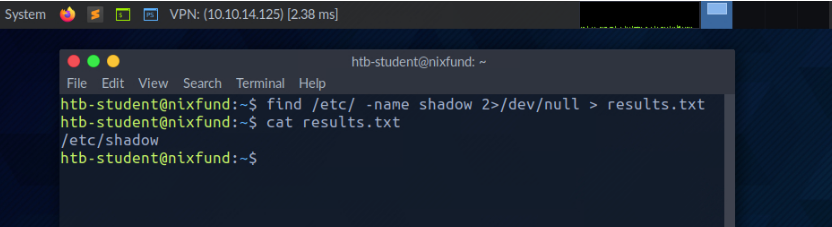
This command:
- Redirects errors to
/dev/null. - Redirects standard output to
results.txt.
The following two redirections are equivalent:
> results.txt1> results.txtFile descriptor 1 does not have to be specified because STDOUT is the default stream redirected by >.
If results.txt does not exist, it is created automatically. If it already exists, its contents are overwritten.
Redirect STDOUT and STDERR to Separate Files
Standard output and standard error can be redirected to different files:
find /etc/ -name shadow 2> stderr.txt 1> stdout.txt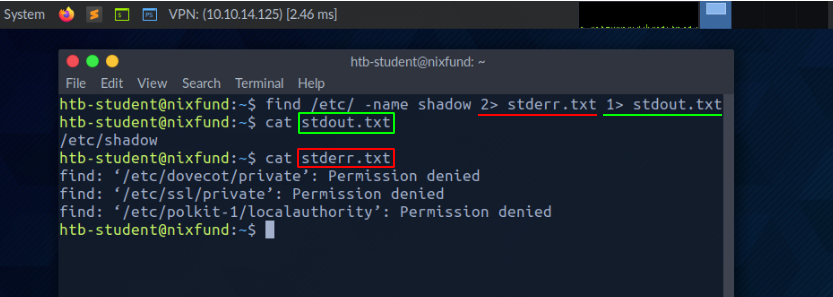
This command creates two files:
| File | Content |
|---|---|
stdout.txt | Standard output from file descriptor 1 |
stderr.txt | Standard errors from file descriptor 2 |
Append STDOUT to a File
The single greater-than operator (>) overwrites the destination file:
command > output.txtThe double greater-than operator (>>) appends output to the destination file without deleting its existing contents:
find /etc/ -name passwd >> stdout.txt 2>/dev/null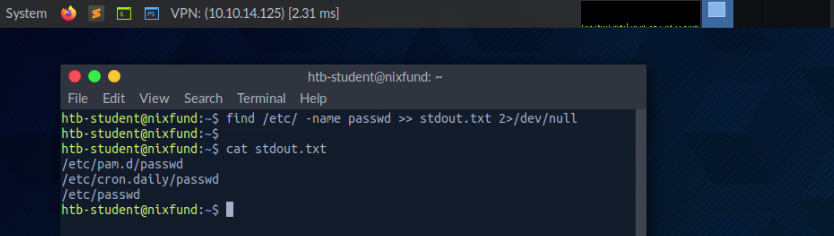
This command appends the results to stdout.txt and redirects errors to /dev/null.
Redirect STDIN from a File
The lower-than operator (<) redirects the contents of a file to the standard input of a command:
cat < stdout.txtIn this example, cat receives the contents of stdout.txt through STDIN.
Redirect an STDIN Stream to a File
The double lower-than operator (<<) can be used to create a here-document.
A here-document allows multiple lines of input to be supplied to a command:
cat << EOF > stream.txt
Hack The Box
EOF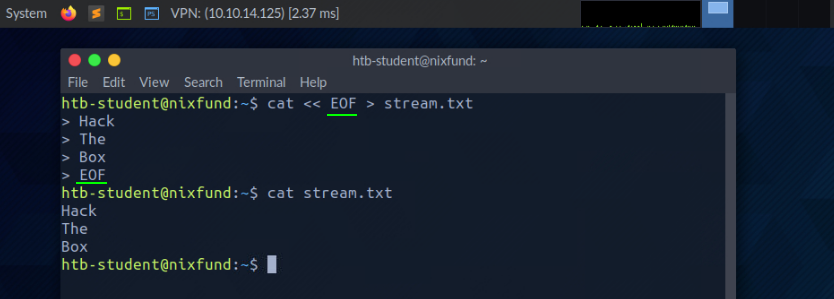
In this example:
<< EOFstarts the input stream.Hack The Boxis the content supplied throughSTDIN.- The second
EOFends the input stream. > stream.txtredirects the output tostream.txt.
The word EOF is a delimiter and can be replaced with another identifier.
Pipes
A pipe (|) sends the standard output of one command to the standard input of another command.
The following command searches for files ending in .conf and filters the results to include only lines containing systemd:
find /etc/ -name "*.conf" 2>/dev/null | grep systemd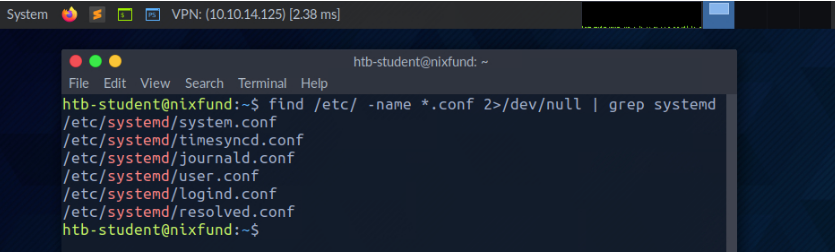
The command works as follows:
findsearches for.conffiles.2>/dev/nulldiscards error messages.|sends the remaining output togrep.grep systemddisplays only lines containingsystemd.
Chain Multiple Pipes
Multiple pipes can be chained together.
The following command searches for .conf files, filters results containing systemd, and counts the number of matching lines:
find /etc/ -name "*.conf" 2>/dev/null | grep systemd | wc -l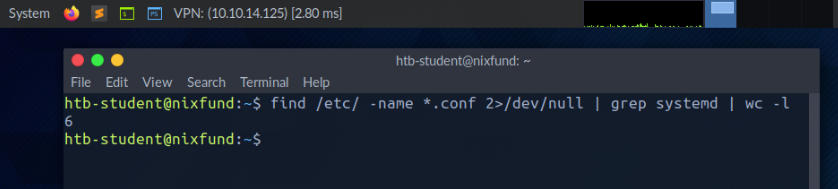
The output from each command becomes the input for the next command:
find → grep → wcExercises
How many .log files exist on the system?
find / -iname "*.log" 2>/dev/null | wc -lCommand breakdown:
| Command | Description |
|---|---|
find / | Searches from the filesystem root |
-iname "*.log" | Finds files with the .log extension, ignoring case |
2>/dev/null | Discards error output |
wc -l | Counts the number of results |
How many .bak files exist on the system?
find / -iname "*.bak" 2>/dev/null | wc -lOutput:
4Submit the Full Path of the xxd Binary
whereis -b xxdOutput:
xxd: /usr/bin/xxdThe full path is:
/usr/bin/xxdComments
Comments
Loading comments…