HTB Academy - Introduction to networking - overview
HTB Academy - Introduction to networking - overview: - Server Gateway: 10.20.0.1/25 - Domain Controller: 10.20.0.10/25 - Client Gateway: 10.20.0.129/25 - Client Workstation: 10.20.0.200/25 - Pentester IP: 10.20.0.252/24 (Set Gateway to 10.20.0.1) • HTB Academy • htb-academy, introduction-to-networking
Most networks use a `/24` subnet, so much so that many Penetration Testers will set this subnet mask (255.255.255.0) without checking. The /24 network allows computers to talk to each other as long as the first three octets of an IP Address are the same (ex: 192.168.1.xxx). Setting the subnet mask to `/25` divides this range in half, and the computer will be able to talk to only the computers on "its half." We have seen Penetration Test reports where the assessor claimed a Domain Controller was offline when it was just on a different network in reality. The network structure was something like this:- Server Gateway: 10.20.0.1/25
- Domain Controller: 10.20.0.10/25
- Client Gateway: 10.20.0.129/25
- Client Workstation: 10.20.0.200/25
- Pentester IP: 10.20.0.252/24 (Set Gateway to 10.20.0.1)
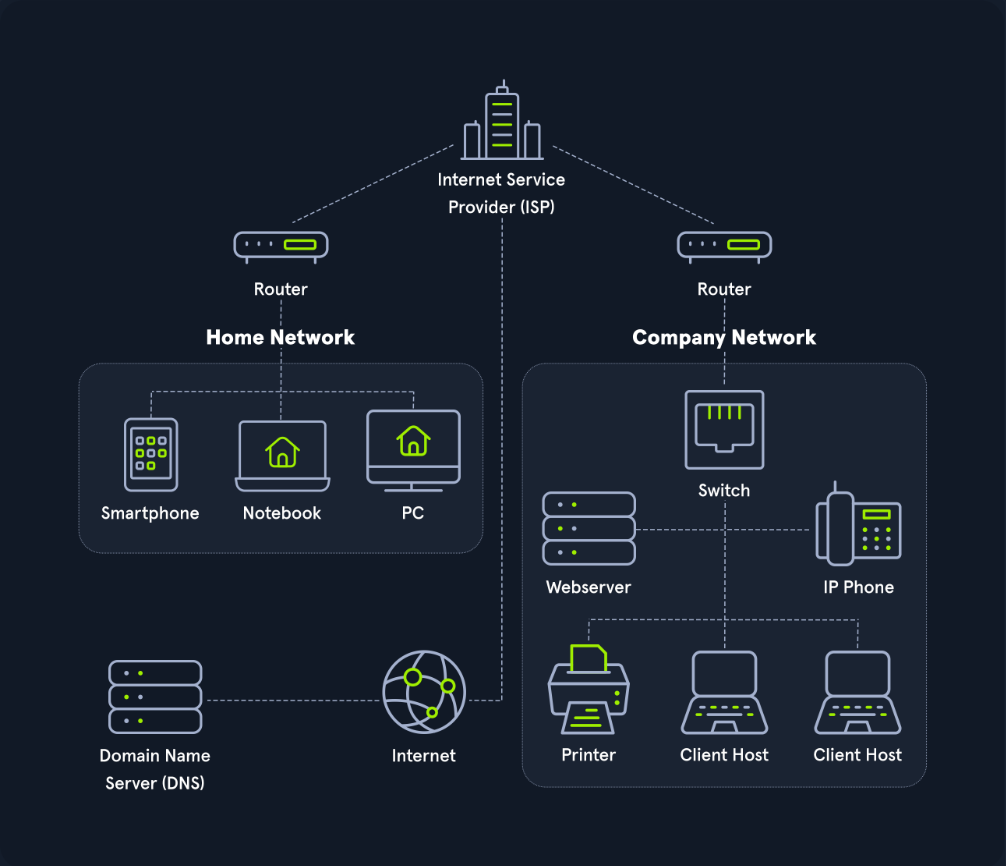
1 - The webserver should be ina DMZ(Demilitarized Zone) because clients on the internet can initiate communications with the website. By placing its in a own seperate network the administrators could put protection between the webserver and other devices.
 2 - Workstations should be on their own network, and in a perfect world, each workstation should have a Host-Based Firewall rule preventing it from talking to other workstations. If a Workstation is on the same network as a Server, networking attacks like `spoofing` or `man in the middle` become much more of an issue.
```sql
```sql
3 - The Switch and Router should be on an "Administration Network." This prevents workstations from snooping in on any communication between these devices. I have often performed a Penetration Test and saw `OSPF` (Open Shortest Path First) advertisements. Since the router did not have a `trusted network`, anyone on the internal network could have sent a malicious advertisement and performed a `man in the middle` attack against any network. 4- IP Phones should be on their own network. Security-wise this is to prevent computers from being able to eavesdrop on communication. In addition to security, phones are unique in the sense that latency/lag is significant. Placing them on their own network can allow network administrators to prioritize their traffic to prevent high latency more easily.5 - Printers should be on their own network. This may sound weird, but it is next to impossible to secure a printer. Due to how Windows works, if a printer tells a computer authentication is required during a print job, that computer will attempt an NTLMv2 authentication, which can lead to passwords being stolen. Additionally, these devices are great for persistence and, in general, have tons of sensitive information sent to them.
The website address or Uniform Resource Locator (URL) which we enter into our browser is also known as Fully Qualified Domain Name (FQDN).
- an
FQDN([www.hackthebox.eu](https://www.hackthebox.eu)) only specifies the address of the "building" - an
URL([https://www.hackthebox.eu/example?floor=2&office=dev&employee=17)](https://www.hackthebox.eu/example?floor=2&office=dev&employee=17))also specifies the "floor," "office," "mailbox" and the corresponding "employee" for whom the package is intended.
We will discuss the exact representations and definitions more clearly and precisely in other sections.
The fact is that we know the address, but not the exact geographical location of the address. In this situation, the post office can determine the exact location, which then forwards the packets to the desired location. Therefore, our post office forwards our packets to the main post office, representing our Internet Service Provider (ISP).
Our post office is our router which we utilize to connect to the "Internet" in networking.
As soon as we send our packet through our post office (`router`), the packet is forwarded to the `main post office` (`ISP`). This main post office looks in the `address register`/`phonebook` (`Domain Name Service`) where this address is located and returns the corresponding geographical coordinates (`IP address`). Now that we know the address's exact location, our packet is sent directly there by a direct flight via our main post office.After the web server has received our packet with the request of what their website looks like, the webserver sends us back the packet with the data for the presentation of the website via the post office (router) of the "Company Network" to the specified return address (our IP address).
Comments
Comments
Loading comments…