HTB Academy Kerberos
HTB Academy Kerberos: Give myself (and future me) a crisp, ops‑ready refresher on the core AD protocols I keep touching: Kerberos, DNS, LDAP, and MSRPC—how they fit together, what traffic looks like, and quick commands I actually use when things break. • HTB Academy • htb-academy, kerberos
Kerberos, DNS, LDAP, MSRPC
🎯 Objective
Give myself (and future me) a crisp, ops‑ready refresher on the core AD protocols I keep touching: Kerberos, DNS, LDAP, and MSRPC—how they fit together, what traffic looks like, and quick commands I actually use when things break.
🧩 What I’m covering
- Kerberos: ticket‑based, mutual auth; AS‑REQ/TGT → TGS flow; why passwords aren’t sent over the wire.
- DNS: SRV records, DC discovery, TCP/UDP 53; quick forward/reverse lookups.
- LDAP: directory reads/writes, binds, common ports and SRV records.
- MSRPC: endpoint mapper, dynamic ports, and where it shows up in day‑to‑day ops.
- Handy copy‑paste commands and troubleshooting notes.
Kerberos
Kerberos has been the default domain authentication protocol since Windows 2000. It’s ticket‑based (no passwords sent), supports mutual authentication, and the KDC (Key Distribution Center) runs on DCs.
High‑level flow
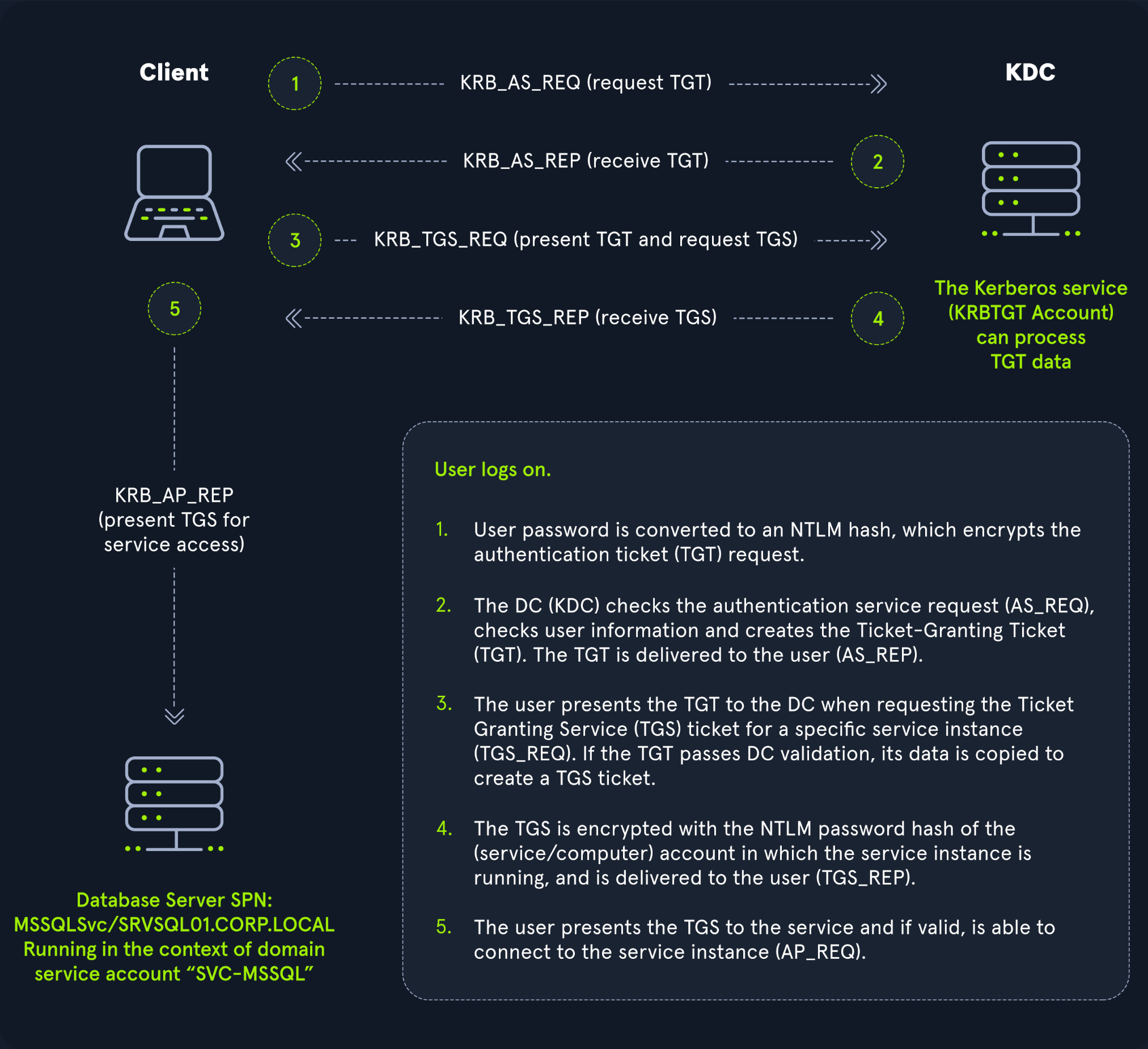
- Logon – Client derives a key from the user’s password (NT hash) and requests a TGT (AS‑REQ).
- KDC validates – If it can decrypt the request, it issues a TGT (AS‑REP).
- Service request – Client presents TGT to DC and requests a TGS for a specific service (TGS‑REQ).
- TGS issuance – DC encrypts the TGS with the service account’s NTLM password hash and returns it (TGS‑REP).
- Access – Client presents the TGS to the target service (AP‑REQ). If it decrypts, access is granted.
Kerberos effectively decouples credentials from resource access. The KDC is stateless regarding prior requests; a valid TGT implies prior proof of identity.
Diagram
DNS
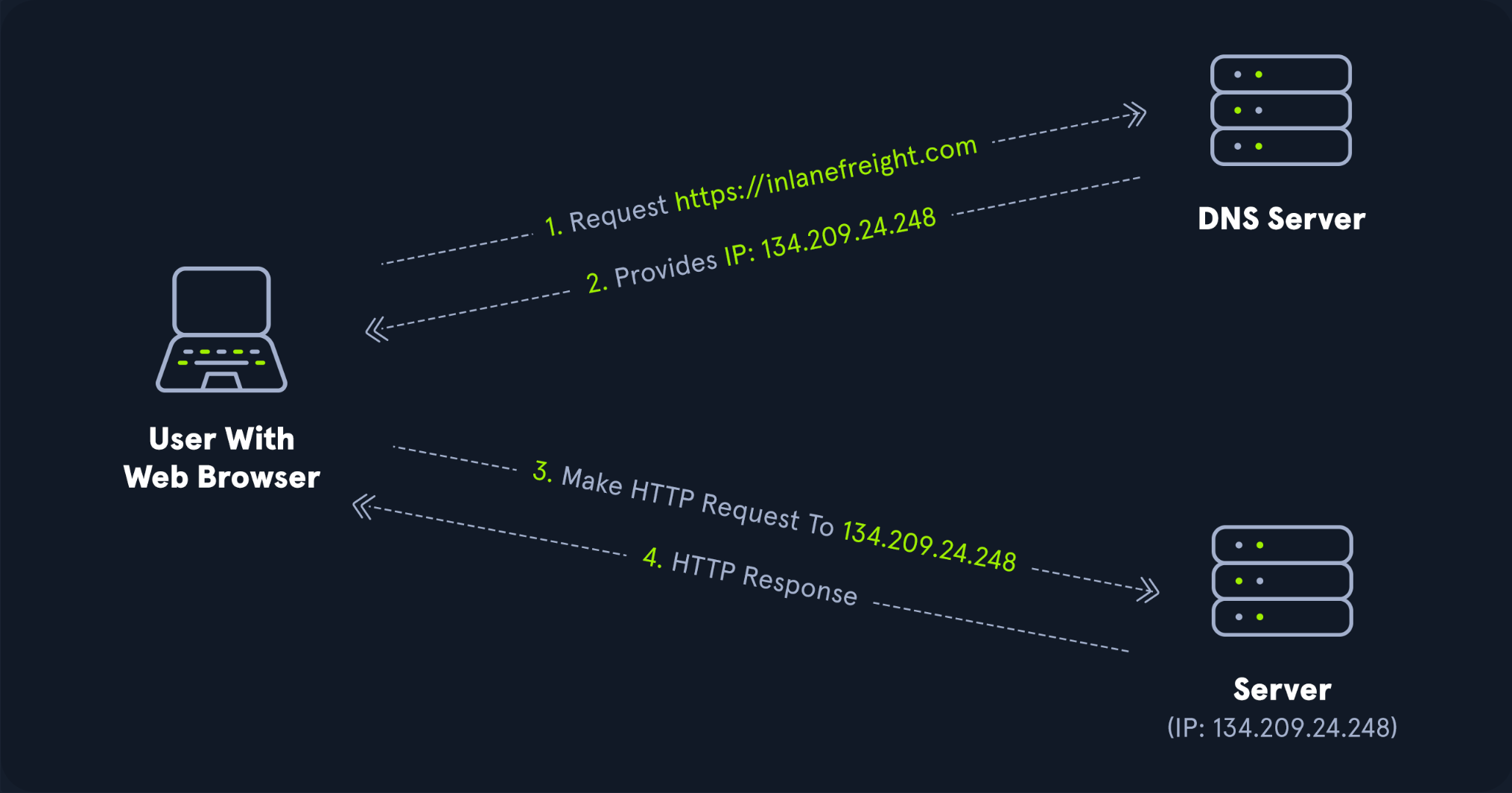
AD DS uses DNS for DC discovery and name resolution. Clients locate services (including DCs) via SRV records, and DCs talk among themselves with DNS too. AD relies on Dynamic DNS so hosts update their own records.
If DNS is wrong, everything is wrong. Clients won’t find DCs, Kerberos will fail, GPOs won’t apply, etc.
- Ports: UDP/53 (default), TCP/53 (fallback/large answers).
- SRV examples (query style):
_ldap._tcp.dc._msdcs.example.local,_kerberos._tcp.example.local.
Forward lookup (example)
PS C:\htb> nslookup INLANEFREIGHT.LOCAL
Server:  172.16.6.5
Address: 172.16.6.5

Name:    INLANEFREIGHT.LOCAL
Address: 172.16.6.5
Why nslookup? Quick, everywhere, and shows which resolver answered (authoritative vs. cached).
Reverse lookup (example)
PS C:\htb> nslookup 172.16.6.5
Server:  172.16.6.5
Address: 172.16.6.5

Name:    ACADEMY-EA-DC01.INLANEFREIGHT.LOCAL
Address: 172.16.6.5
Non‑interactive vs interactive
- Non‑interactive:
nslookup www.google.co.uk→ one‑shot query. - Interactive: run
nslookupfirst, then use sub‑commands (e.g.,set type=SRV,server 172.16.6.5, etc.).
LDAP
The directory itself. Used for auth (binds) and queries/updates (users, groups, computers, OUs, GPO links).
- Ports: 389/TCP,UDP (LDAP); 636/TCP (LDAPS). Global catalog: 3268 (LDAP), 3269 (LDAPS).
- Binds: simple bind (cleartext unless protected), SASL binds (incl. Kerberos).
- SRV records:
_ldap._tcp.dc._msdcs.<domain>for DCs/GCs. - Common ops: user/group lookups, group membership resolution, servicePrincipalName searches.
Quick checks
# Query SRV for DCs (interactive nslookup)
> nslookup
> set type=SRV
> _ldap._tcp.dc._msdcs.INLANEFREIGHT.LOCAL

# PowerShell: resolve A and SRV
Resolve-DnsName INLANEFREIGHT.LOCAL
Resolve-DnsName _ldap._tcp.dc._msdcs.INLANEFREIGHT.LOCAL -Type SRV
MSRPC
Microsoft’s RPC stack. Tons of Windows services ride on top of it (SAMR, LSARPC, EPM, etc.).
- Endpoint Mapper: 135/TCP tells clients which dynamic port (high ephemeral) a service is listening on.
- Over SMB named pipes:
\PIPE\samr,\PIPE\lsarpc, etc. - You’ll see it in domain joins, password changes, group enumeration, printer management, and a lot of MMC snap‑ins.
Why I care
- Firewalls must allow RPC 135 + dynamic ports (or use constrained port ranges).
- Broken RPC breaks “random” admin tasks (user/group ops in ADUC, gpresult, etc.).
📎 Copy‑paste crib
DNS basics
# One-shot
nslookup INLANEFREIGHT.LOCAL
nslookup 172.16.6.5

# Interactive SRV lookup
nslookup
> set type=SRV
> _ldap._tcp.dc._msdcs.INLANEFREIGHT.LOCAL
> _kerberos._tcp.INLANEFREIGHT.LOCAL
PowerShell alternatives
Resolve-DnsName INLANEFREIGHT.LOCAL
Resolve-DnsName _ldap._tcp.dc._msdcs.INLANEFREIGHT.LOCAL -Type SRV
Resolve-DnsName ACADEMY-EA-DC01.INLANEFREIGHT.LOCAL
Kerberos quick sanity
klist             # show cached TGT/TGS
nltest /dsgetdc:INLANEFREIGHT.LOCAL
nltest /dclist:INLANEFREIGHT.LOCAL
LDAP poke (no creds shown)
# Requires RSAT/AD module
Get-ADDomainController -Discover -Service PrimaryDC
Get-ADUser -Filter 'samAccountName -eq "administrator"' -Properties * | fl Name,UserPrincipalName,Enabled
🧪 Troubleshooting notes
- DNS: Check SRV records; flush client cache
ipconfig /flushdns; re‑registeripconfig /registerdns. Ensure clients use AD DNS, not public resolvers. - Kerberos: System time drift breaks tickets; check NTP. Missing SPNs cause service ticket failures.
- LDAP: Prefer LDAPS or channel binding; simple bind over 389 is plaintext.
- MSRPC: If MMC snap‑ins hang, verify 135/TCP and dynamic RPC range are open host↔DC.
🔒 Ops / Security reminders
- Enforce Kerberos where possible; restrict/monitor legacy NTLM.
- Require LDAP signing/channel binding; prefer LDAPS.
- Lock down DNS updates; monitor SRV changes; avoid split‑brain misconfigs.
- Constrain RPC port ranges and document firewall rules.
- Audit and alert on authentication anomalies (repeated TGT failures, SRV tampering, resolver flips).
✅ Result
A focused, at‑a‑glance protocol guide I can keep reusing: what Kerberos/DNS/LDAP/MSRPC actually do in AD, how to validate they’re healthy, and quick commands to diagnose when they’re not.
Comments
Comments
Loading comments…