HTB Academy - LDAP
HTB Academy - LDAP: Keep a clear, ops-ready explainer of LDAP and MSRPC in AD: what they are, how they’re used, how to query/troubleshoot them, and what to lock down. Short, copy‑pasteable, and practical. • HTB Academy • htb-academy, ldap
🎯 Objective
Keep a clear, ops-ready explainer of LDAP and MSRPC in AD: what they are, how they’re used, how to query/troubleshoot them, and what to lock down. Short, copy‑pasteable, and practical.
🧩 What I’m covering
- LDAP v3 (RFC 4511) in AD: ports, binds (Simple vs SASL/Kerberos), why LDAPS matters.
- How apps “speak” to AD using LDAP (the protocol) vs AD (the directory service).
- MSRPC: core interfaces you’ll actually see (LSARPC, NETLOGON, SAMR, DRSUAPI) and why they matter to red/blue.
- Quick commands + troubleshooting + defense notes.
LDAP in AD (quick view)
- Protocol: LDAP v3 (open standard; cross‑platform).
- Ports:
389/tcp,udp(LDAP),636/tcp(LDAPS). - Role: Directory queries/updates (users, groups, computers, OUs), and authentication via bind.
- Who listens: Domain Controllers (Directory System Agent).
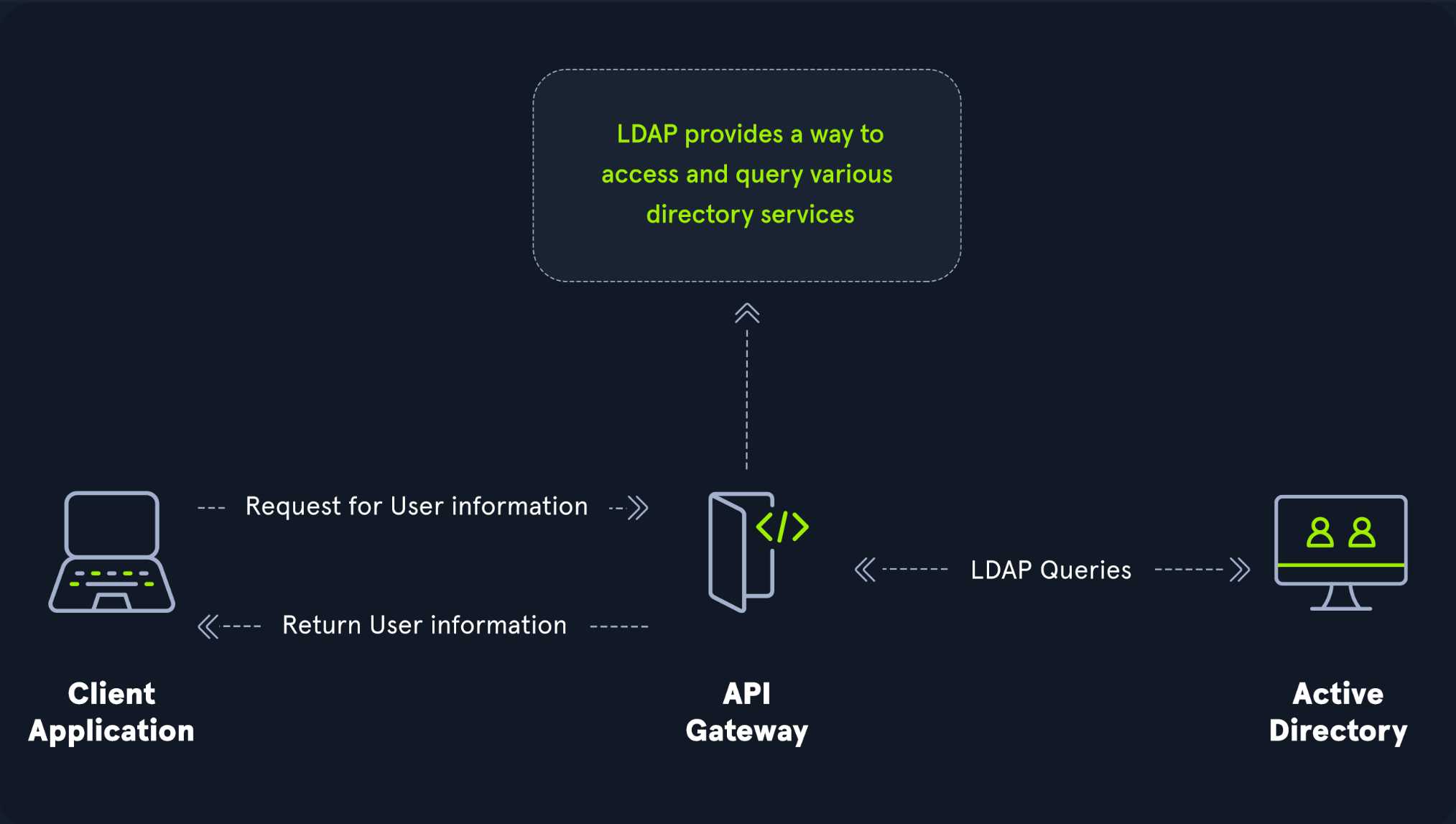
Analogy: AD : LDAP :: Apache : HTTP. AD is the directory service; LDAP is the protocol apps use to talk to it. You may also encounter non‑AD LDAP (e.g., OpenLDAP).
🔐 LDAP Authentication (BIND)
Two main flavors:
Simple Authentication
Anonymous, unauthenticated (rare), or username/password. With Simple binds on 389, creds are cleartext unless you wrap with TLS/StartTLS or use LDAPS (636).SASL Authentication
SASL hands off auth to mechanisms like Kerberos (GSSAPI). LDAP transports the negotiation; Kerberos does the proving. This separates the app protocol from the auth method and can add integrity/confidentiality depending on mech/flags.
Use LDAPS or StartTLS to protect Simple binds. Many orgs require LDAP signing and channel binding to prevent downgrade/relay issues.
MSRPC in AD
Microsoft RPC underpins a ton of Windows/AD management. Clients hit the Endpoint Mapper on 135/tcp, then negotiate a dynamic high port (or use SMB named pipes). Four interfaces you’ll keep seeing:
| Interface | What it talks to | Why it matters |
|---|---|---|
| lsarpc | Local Security Authority (LSA) | Query/set security policy, SID/Name lookups, trust info. Policy admin footprints; enumeration primitives. |
| netlogon | NETLOGON service | Secure channel for machine/user auth; DC locator; logon processes. Weaknesses show up in relay/hardening gaps. |
| samr | Security Accounts Manager (SAM) | Manage/read users/groups/computers. By default any authenticated user can query a lot (attack path recon). Lock this down. |
| drsuapi | Directory Replication Service (DRS) | DC replication calls. Abused for DCSync/NTDS extraction (hashes) via tools like secretsdump.py. |
RPC often rides SMB named pipes (
\PIPE\samr,\PIPE\lsarpc, …). Firewalls must allow135/tcp+ a constrained dynamic range for management to work reliably.
📎 Copy‑paste crib
LDAP — quick checks
# Linux/Mac: base naming contexts (what DC advertises)
ldapsearch -x -H ldap://dc01.inlanefreight.local -s base -b "" namingcontexts

# Query a DN (anonymous or explicit bind)
ldapsearch -x -H ldap://dc01.inlanefreight.local -D 'INLANEFREIGHT\wiener' -W -b 'DC=INLANEFREIGHT,DC=LOCAL' '(sAMAccountName=carlos)' cn memberOf

# LDAPS test (cert must be trusted on the client)
ldapsearch -x -H ldaps://dc01.inlanefreight.local -b '' -s base supportedSASLMechanisms# Windows PowerShell: DNS SRV records for DCs
Resolve-DnsName _ldap._tcp.dc._msdcs.INLANEFREIGHT.LOCAL -Type SRV
# Show current Kerberos tickets (useful if SASL/GSSAPI in play)
klistMSRPC — discovery & abuse (lab/assessment context)
# Enumerate RPC endpoints (Impacket)
rpcdump.py dc01.inlanefreight.local

# SAMR over SMB named pipe (null/guest will usually fail; use a domain user)
rpcclient -U 'INLANEFREIGHT\wiener%peter' dc01.inlanefreight.local -c 'enumdomusers; enumdomgroups'

# DRSUAPI / DCSync (requires rights like Replicate Directory Changes)
secretsdump.py 'INLANEFREIGHT/wiener:peter@dc01.inlanefreight.local' -just-dc
DNS — DC discovery sanity
nslookup
> set type=SRV
> _ldap._tcp.dc._msdcs.INLANEFREIGHT.LOCAL
> _kerberos._tcp.INLANEFREIGHT.LOCAL
🧪 Troubleshooting
LDAP
- Simple binds over 389 are cleartext; use StartTLS/LDAPS.
- If LDAPS fails, check DC certificate (EKU for server auth), CRL reachability, and client trust.
- Enforce LDAP signing and channel binding; confirm clients support it.
- Bind DN/UPN mistakes are common (
user@domainvsDOMAIN\user).
MSRPC
- Firewalls: allow
135/tcpand a constrained dynamic RPC range or named pipes over SMB. - If ADUC/RSAT tools hang, suspect RPC path or name resolution.
- Restrict SAMR remote queries (NetCease‑style hardening) to cut authenticated recon noise.
- For DCSync misuse, audit Replicate Directory Changes rights and service accounts.
🔒 Defense (blue‑team notes)
- Prefer Kerberos/SASL binds; require LDAPS.
- Enable LDAP signing/channel binding and monitor Simple Bind usage.
- Harden SAMR access (limit to admins), and monitor for unusual RPC calls.
- Constrain RPC dynamic ports; document firewall rules between admin hosts and DCs.
- Audit and alert on DCSync‑like activity and anomalous replication traffic.
✅ Takeaways
- LDAP is the language; AD is the directory. Use LDAPS (or StartTLS) and SASL/Kerberos where possible.
- MSRPC is everywhere in Windows management—know lsarpc/netlogon/samr/drsuapi and what exposure each brings.
- The copy‑paste blocks above cover 80% of what I tend to do when validating or debugging these paths.
Comments
Comments
Loading comments…