HTb Academy - Network Types
HTb Academy - Network Types: Give a clear, practical reference for common network types (WAN, LAN/WLAN, VPN) and related book terms (GAN, MAN, PAN/WPAN), with security notes and quick verification steps you can run on a host. • HTB Academy • htb-academy, module34
Network Types & VPNs — ENHANCED Guide
🎯 Objective
Give a clear, practical reference for common network types (WAN, LAN/WLAN, VPN) and related book terms (GAN, MAN, PAN/WPAN), with security notes and quick verification steps you can run on a host.
🧭 Scope & Assumptions
- Audience: blue-teamers, pentesters, homelab builders.
- Focus: conceptual clarity + quick checks from a client or edge device.
- IP addressing references follow RFC 1918 for private networks.
📚 Core Definitions (At a Glance)
| Network Type | Definition / Where You’ll See It |
|---|---|
| Wide Area Network (WAN) | The “Internet” or any large interconnection of LANs. Often uses WAN routing protocols (e.g., BGP) and non‑RFC1918 addressing. |
| Local Area Network (LAN) | Internal, localized network (home/office). Typically RFC1918 address space. |
| Wireless LAN (WLAN) | LAN accessed over Wi‑Fi. Same IP model as LAN; wireless is primarily a security and access distinction. |
| Virtual Private Network (VPN) | Makes a user/site appear logically inside another network over an encrypted tunnel. Includes site‑to‑site, remote access, and SSL (clientless) VPN styles. |
RFC 1918 private ranges:
10.0.0.0/8,172.16.0.0/12,192.168.0.0/16
🌐 WAN
A WAN is a large network of joined LANs. Public Internet is the canonical WAN, but many enterprises maintain internal WANs (intranets/air‑gapped networks).
How to recognize a WAN context
- Edge devices speak BGP (or other WAN routing protocols).
- Client/edge IPs are not RFC1918 (public or provider-assigned).
- Path traverses multiple autonomous systems (AS) upstream.
Rule of thumb: “Is this address routable on the Internet?” If yes, you’re in WAN space.
🏠 LAN / WLAN
LAN = local wired network. WLAN = the same local network but over Wi‑Fi (radio). Functionally identical from IP’s perspective; WLAN is a medium (wireless) and security boundary.
- Typical addressing: RFC1918 (10/8, 172.16/12, 192.168/16).
- Some institutions (hotels/campuses) may hand out public IPs on access—rarer today.
Examples
- Home router: 192.168.1.0/24
- Office core: 10.10.0.0/16
- Guest Wi‑Fi VLAN: 172.16.50.0/24
WLAN security quick hits
- Prefer WPA3‑Personal (home) or WPA2‑Enterprise / 802.1X (corp).
- Disable WPS, use strong PSKs if not doing 802.1X.
- Segment guest/IoT via VLANs; consider AP isolation for guests.
🧪 VPN Overview
All VPNs aim to make you appear inside a different network.
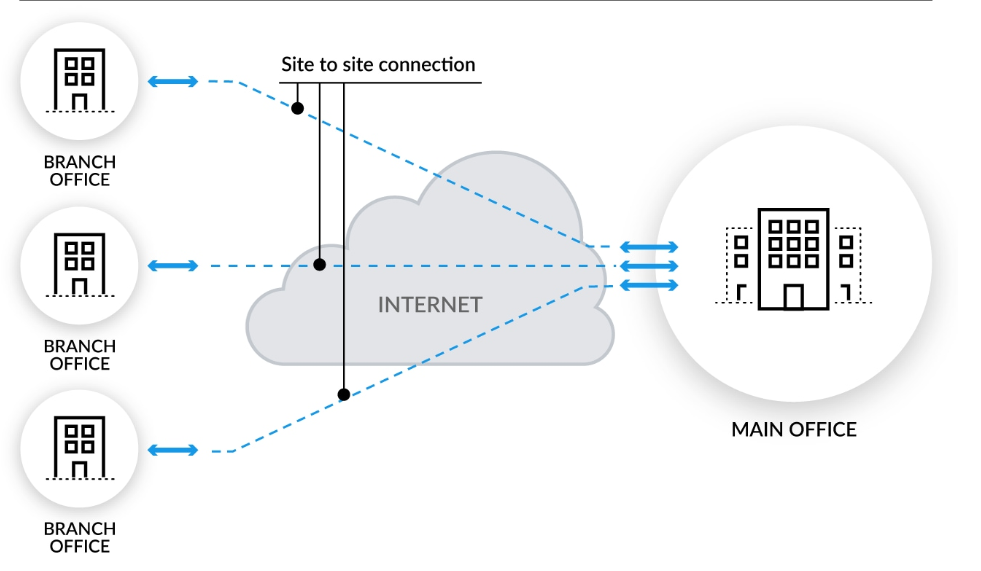
🔗 Site‑to‑Site VPN
- Both ends are network devices (routers/firewalls).
- Shares entire subnets; permanent encrypted link between offices/sites.
- Typical tech: IPsec policy‑based/route‑based, sometimes GRE+IPsec.
Why pure site‑to‑site isn’t always enough today
- Cloud/SaaS shifts make hair‑pinning to HQ inefficient. Consider direct-to-cloud or SD‑WAN/SASE designs.
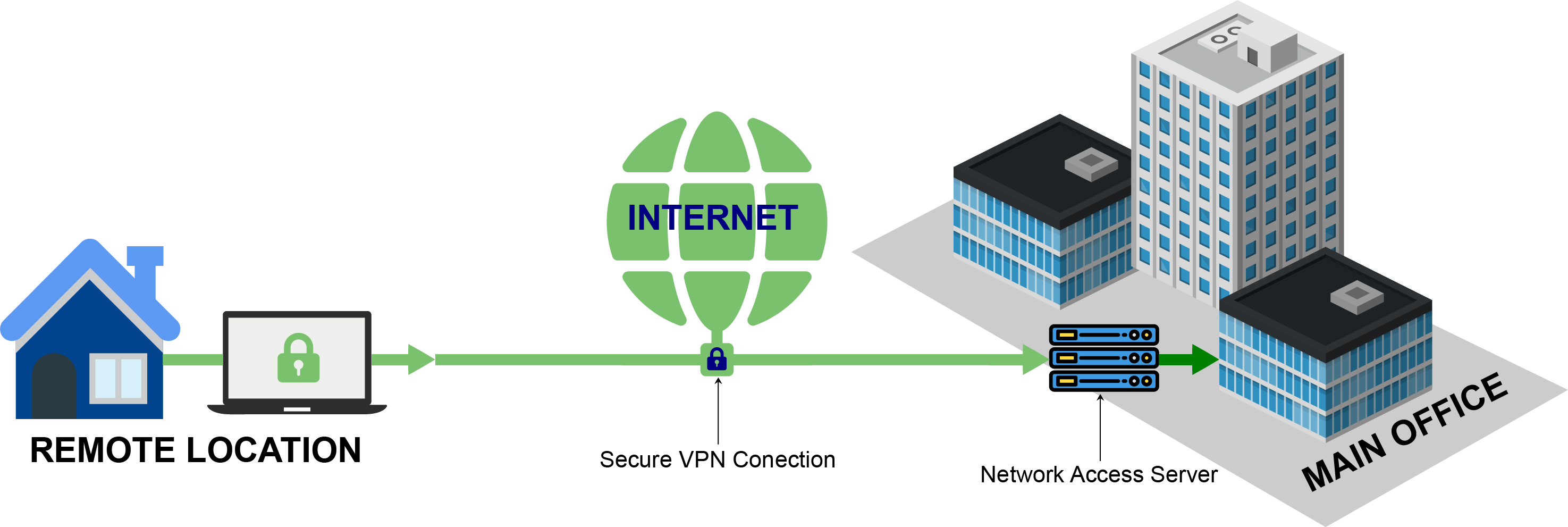
👤 Remote Access VPN
- Individual client creates a virtual interface (TUN/TAP) and receives routes.
- Split‑tunnel: only specific prefixes go through VPN (e.g.,
10.10.0.0/16). Internet egress stays local (good for HTB labs; riskier for corp security). - Full‑tunnel: all traffic via VPN gateway (centralized egress/inspection).
Example (OpenVPN/TUN):
# Inspect routes added by a VPN client (Linux)
ip route show table main | grep -E 'tun|wg|ppp|10\.10\.'
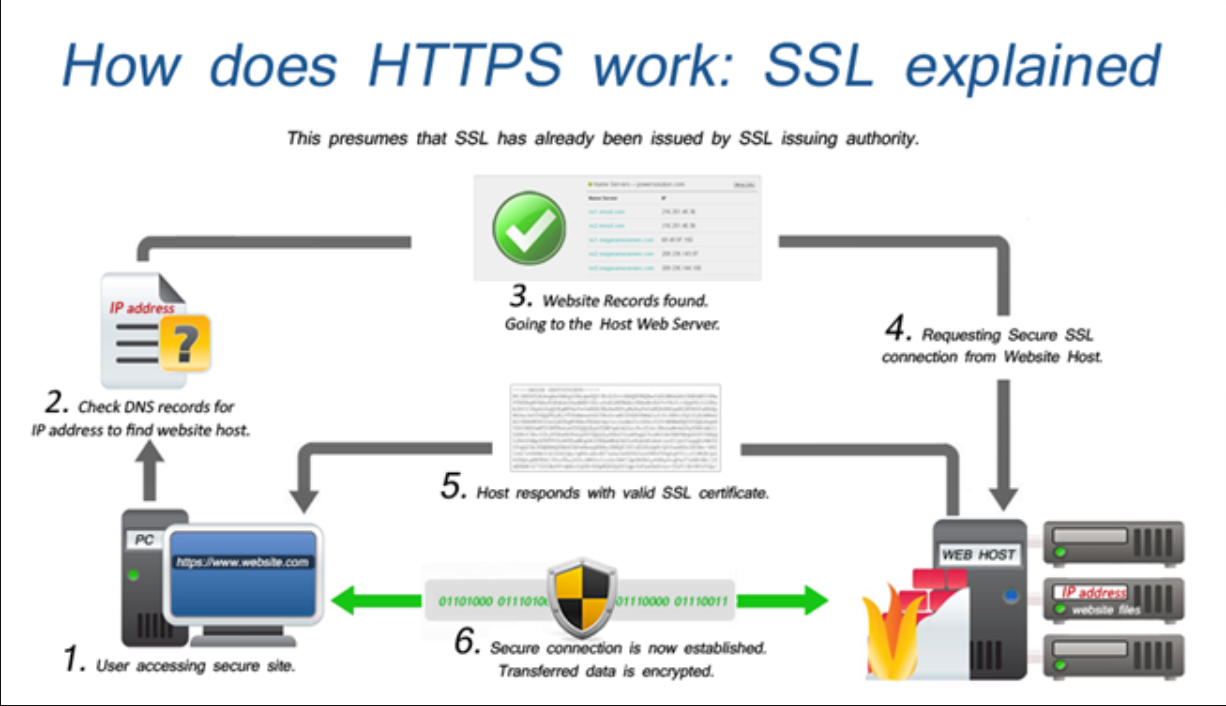
🌐 SSL VPN (Clientless / Browser-based)
- Runs over HTTPS; often provides app/desktop portals in the browser.
- Great for ad‑hoc access without a full client.
🧭 Choosing the Right Model (Quick Matrix)
| Goal | Best Fit | Notes |
|---|---|---|
| Connect two offices permanently | Site‑to‑Site IPsec | Advertise subnets; integrate with IGP/SD‑WAN if needed. |
| Give employees access from anywhere | Remote Access VPN | Prefer full‑tunnel for centralized security; split‑tunnel for labs. |
| Publish a few internal apps securely | SSL VPN / ZTNA | Browser portal, granular per‑app access; strong MFA required. |
🔍 Quick Identification & Validation
Detect where you are (client-side)
# Show local addresses (Linux)
ip addr

# Is your default route going through a VPN adapter?
ip route | sed -n '1,5p'

# DNS servers (NetworkManager)
nmcli dev show | grep -i 'DNS'

# What’s my public IP? (if allowed)
curl -s https://ifconfig.io ; echo
LAN vs WAN sanity checks
- If your host IP is RFC1918 and default route points to a local gateway → LAN/WLAN.
- If you see a tunnel interface with specific routes (10/172/192), you’re likely on Remote Access VPN.
- If packets to a branch subnet go out your local LAN GW, but show encrypted ESP on the wire between edge devices → Site‑to‑Site VPN.
🛡️ Security Considerations
- Enforce MFA on all remote access/SSL VPNs.
- Use least privilege routing (export only necessary prefixes).
- Terminate tunnels on hardened devices; keep firmware updated.
- For split‑tunnel deployments, add EDR on endpoints + DNS/DoH/DoT policies.
- Monitor tunnel health & logs (ISAKMP/IKE/IPsec SAs, TLS session stats).
📖 Book Terms (Extended)
| Term | Definition |
|---|---|
| Global Area Network (GAN) | Worldwide networks (e.g., the Internet) or private global backbones spanning multiple WANs (undersea fiber, satellite). |
| Metropolitan Area Network (MAN) | Regional broadband network interconnecting multiple LANs in a city/metro via fiber/leased lines—enterprise‑grade throughput. |
| Personal Area Network (PAN) | Short‑range cabled personal network around a user/device. |
| Wireless PAN (WPAN) | Bluetooth / Wireless USB micro‑nets (a.k.a. piconets). Used in IoT and smart homes (e.g., Insteon, Z‑Wave, ZigBee). |
GAN
A Global Area Network spans multiple WANs and continents. Enterprises may operate private global networks over carrier fibers and satellite links.
MAN
A Metropolitan Area Network connects several LANs in a metro region with fiber and high‑performance routing—latency/throughput akin to intra‑LAN links.
PAN / WPAN
Ad‑hoc personal networks. Wireless forms (WPAN) typically use Bluetooth and are common in IoT. Range is a few meters; not suitable for cross‑building links.
🧩 Examples & Visuals
Site‑to‑Site Topology
Remote Access (Concept)
SSL VPN Portal
✅ Troubleshooting Checklist
- IP is RFC1918 and gateway is local → likely LAN/WLAN.
- TUN/TAP interface present with specific routes → Remote Access VPN.
- Branch prefixes reachable and encrypted between edges → Site‑to‑Site.
- Cloud/SaaS latency high? Consider direct internet access + SASE/ZTNA.
- Wi‑Fi weak security? Upgrade to WPA3 / use 802.1X with RADIUS.
- Split‑tunnel corporate VPN? Confirm endpoint security & DNS policies.
📎 References & Further Reading
- RFC 1918 — Address Allocation for Private Internets
- NIST SP 800‑77 — Guide to IPsec VPNs
- Vendor docs: IPsec, OpenVPN, SSL VPN, ZTNA/SASE
- Bluetooth Core Spec; ZigBee, Z‑Wave protocol overviews
🧱 Appendix: Handy Commands
# Linux: routing and interfaces
ip addr
ip route
ip -br a

# Show active TCP/UDP ports
ss -tulpen

# Trace a path (ICMP/UDP/TCP modes)
traceroute -I example.com
traceroute -T -p 443 example.com

# Observe ESP (IPsec) on the wire (needs privileges)
sudo tcpdump -ni any proto 50 or port 4500

# OpenVPN process/routes quick peek
ps aux | grep -i openvpn
ip route | grep -E 'tun|10\.10\.'

# Wi-Fi basics (NetworkManager)
nmcli dev wifi list
nmcli con show
Prepared in the same “ENHANCED” structure you’ve used previously — objective → definitions → practical guidance → validation → references.
Comments
Comments
Loading comments…