HTB Academy - Windows Services & Processes
HTB Academy - Windows Services & Processes: window services can be listed by following command • HTB Academy • htb-academy, module49
window services can be listed by following command
Get-Serviceor you could use command-line and write sc.exe.
You could also query for a service
PS C:\htb> Get-Service | ? {$_.Status -eq "Running"} | select -First 2 |fl Name : AdobeARMservice DisplayName : Adobe Acrobat Update Service Status : Running DependentServices : {} ServicesDependedOn : {} CanPauseAndContinue : False CanShutdown : False CanStop : True ServiceType : Win32OwnProcess Name : Appinfo DisplayName : Application Information Status : Running DependentServices : {} ServicesDependedOn : {RpcSs, ProfSvc} CanPauseAndContinue : False CanShutdown : False CanStop : True ServiceType : Win32OwnProcess, Win32ShareProcesssome services is good to know:
| Service | Description |
|---|---|
| smss.exe | Session Manager SubSystem. Responsible for handling sessions on the system. |
| csrss.exe | Client Server Runtime Process. The user-mode portion of the Windows subsystem. |
| wininit.exe | Starts the Wininit file .ini file that lists all of the changes to be made to Windows when the computer is restarted after installing a program. |
| logonui.exe | Used for facilitating user login into a PC |
| lsass.exe | The Local Security Authentication Server verifies the validity of user logons to a PC or server. It generates the process responsible for authenticating users for the Winlogon service. |
| services.exe | Manages the operation of starting and stopping services. |
| winlogon.exe | Responsible for handling the secure attention sequence, loading a user profile on logon, and locking the computer when a screensaver is running. |
| System | A background system process that runs the Windows kernel. |
| svchost.exe with RPCSS | Manages system services that run from dynamic-link libraries (files with the extension .dll) such as "Automatic Updates," "Windows Firewall," and "Plug and Play." Uses the Remote Procedure Call (RPC) Service (RPCSS). |
| svchost.exe with Dcom/PnP | Manages system services that run from dynamic-link libraries (files with the extension .dll) such as "Automatic Updates," "Windows Firewall," and "Plug and Play." Uses the Distributed Component Object Model (DCOM) and Plug and Play (PnP) services. |
Local Security Authority Subsystem Service (LSASS)
lsass.exe is the process that is responsible for enforcing the security policy on Windows systems. When a user attempts to log on to the system, this process verifies their log on attempt and creates access tokens based on the user's permission levels. LSASS is also responsible for user account password changes. All events associated with this process (logon/logoff attempts, etc.) are logged within the Windows Security Log. LSASS is an extremely high-value target as several tools exist to extract both cleartext and hashed credentials stored in memory by this process.
Sysinternals Tools
The SysInternals Tools suite is a set of portable Windows applications that can be used to administer Windows systems (for the most part without requiring installation). The tools can be either downloaded from the Microsoft website or by loading them directly from an internet-accessible file share by typing \\live.sysinternals.com\tools into a Windows Explorer window.

For example, we can run procdump.exe directly from this share without downloading it directly to disk.
Identify one of the non-standard update services running on the host. Submit the full name of the service executable (not the DisplayName) as your answer.
Get-Process | select-object Processname, id or powershell -c get-process | select-object Processname, idExamining services using sc
Sc can also be used to configure and manage services. Let's experiment with a few commands.
example
sc query AppInfo
The sc qc command is used to query the service. This is where knowing the names of services can come in handy. If we wanted to query a service on a device over the network, we could specify the hostname or IP address immediately after sc.
sc //hostname or ip of box query ServiceNameWe can also use sc to start and stop services.
sc stop AppInfo
Notice how we are denied access from performing this action without running it within an administrative context. If we run a command prompt with elevated privileges, we will be permitted to complete this action.
Below is another example where another example for another service.
If we were investigating a situation where we suspected that the system had malware, sc would give us the ability to quickly search and analyze commonly targeted services and newly created services. It’s also much more script-friendly than utilizing GUI tools like services.msc.
Another helpful way we can examine service permissions using sc is through the sdshow command.
At an initial glance, the output looks crazy. It almost seems that we have done something wrong in our command, but there is a meaning to this madness. Every named object in Windows is a securable object, and even some unnamed objects are securable. If it's securable in a Windows OS, it will have a security descriptor. Security descriptors identify the object’s owner and a primary group containing a Discretionary Access Control List (DACL) and a System Access Control List (SACL).
Generally, a DACL is used for controlling access to an object, and a SACL is used to account for and log access attempts. This section will examine the DACL, but the same concepts would apply to a SACL.
D:(A;;CCLCSWRPLORC;;;AU)(A;;CCDCLCSWRPWPDTLOCRSDRCWDWO;;;BA)(A;;CCDCLCSWRPWPDTLOCRSDRCWDWO;;;SY)This amalgamation of characters crunched together and delimited by opened and closed parentheses is in a format known as the Security Descriptor Definition Language (SDDL).
We may be tempted to read from left to right because that is how the English language is typically written, but it can be much different when interacting with computers. Read the entire security descriptor for the Windows Update (wuauserv) service in this order starting with the first letter and set of parentheses:
D: (A;;CCLCSWRPLORC;;;AU)
- D: - the proceeding characters are DACL permissions
- AU: - defines the security principal Authenticated Users
- A;; - access is allowed
- CC - SERVICE_QUERY_CONFIG is the full name, and it is a query to the service control manager (SCM) for the service configuration
- LC - SERVICE_QUERY_STATUS is the full name, and it is a query to the service control manager (SCM) for the current status of the service
- SW - SERVICE_ENUMERATE_DEPENDENTS is the full name, and it will enumerate a list of dependent services
- RP - SERVICE_START is the full name, and it will start the service
- LO - SERVICE_INTERROGATE is the full name, and it will query the service for its current status
- RC - READ_CONTROL is the full name, and it will query the security descriptor of the service
As we read the security descriptor, it can be easy to get lost in the seemingly random order of characters, but recall that we are essentially viewing access control entries in an access control list. Each set of 2 characters in between the semi-colons represents actions allowed to be performed by a specific user or group.
;;CCLCSWRPLORC;;;
After the last set of semi-colons, the characters specify the security principal (User and/or Group) that is permitted to perform those actions.
;;;AU
The character immediately after the opening parentheses and before the first set of semi-colons defines whether the actions are Allowed or Denied.
A;;
This entire security descriptor associated with the Windows Update (wuauserv) service has three sets of access control entries because there are three different security principals. Each security principal has specific permissions applied.
Examine service permissions using PowerShell
Using the Get-Acl PowerShell cmdlet, we can examine service permissions by targeting the path of a specific service in the registry.
Get-ACL -Path HKLM:\System\CurrentControlSet\Services\wuauserv | Format-List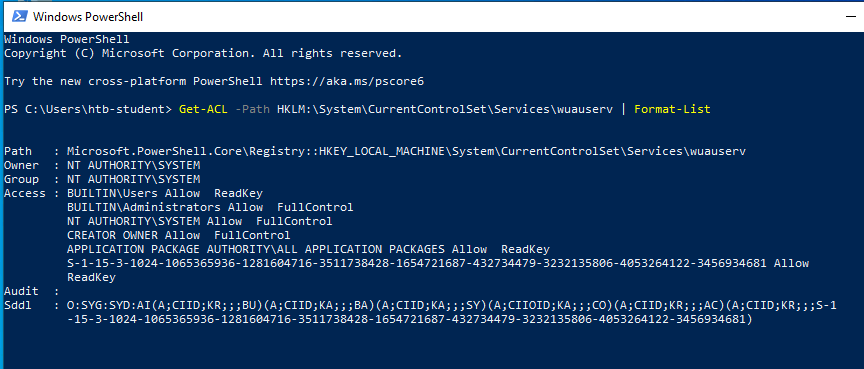
Notice how this command returns specific account permissions in an easy-to-read format and in SDDL. Also, the SID that represents each security principal (User and/or Group) is present in the SDDL. This is something we do not get when running sc from the command prompt.
Knowing how to interact with services and their associated permissions from the command line makes it easier to script out these tasks. While it is good to know how to perform these tasks from the GUI, it does not scale well as we start getting into larger network environments and Domains.
Comments
Comments
Loading comments…