More knowledge about DOM
More knowledge about DOM : I still need more understanding of DOM, • Knowledge • DOM, DOM-based • dom, dom-based
I still need more understanding of DOM,
so I read even more to be able to the testing for the labs.
So I decided to read more.
The Document Object Model, abbreviated DOM, is an application programming interface (API) for HTML and XML files.
It is a tree-like document composed of nodes subdivided into objects, which makes it easy to modify the content in a web browser using scripts.
In addition, the World Wide Web Consortium (W3C) has standardised this API, which can also be used with any browser and any programming language.
Thus, this API allows JavaScript to access the elements of the HTML page in the context of a web browser and to retrieve user events such as: events related to the page (e.g. “onload” after page load), to the mouse, to the keyboard, to the form or to objects such as the body of the page (with document.body).
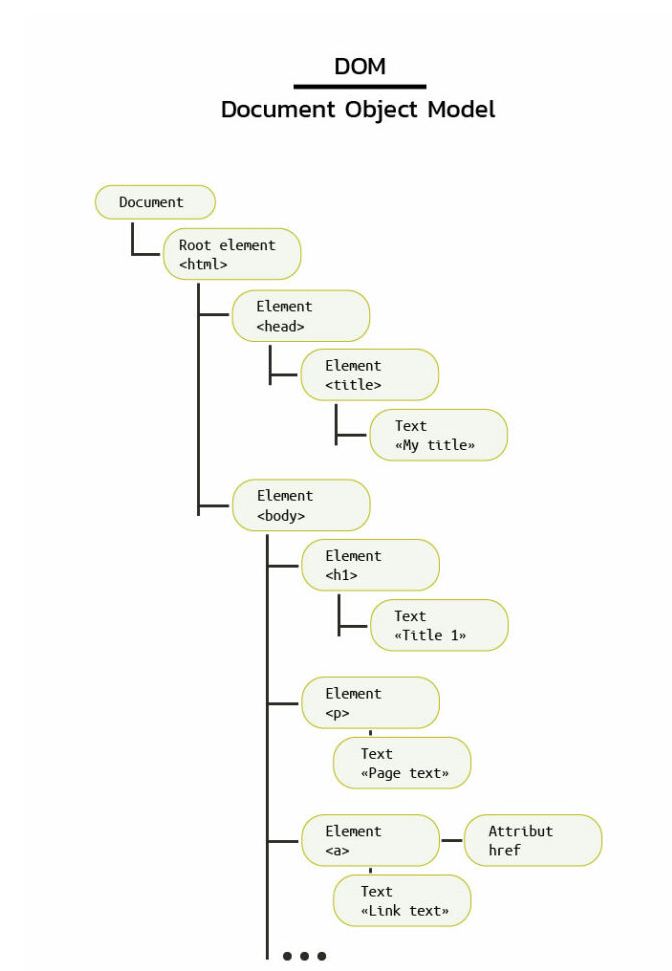
An attacker will inject malicious code into a DOM element, and thus be able to exploit this flaw if the targeted application’s JavaScript takes data from an input that the attacker can control. This is called the source. It sends it to an output that supports dynamic code execution, called sink. There is no interaction with the server to trigger the execution of the desired JavaScript.
The most common source is the URL: phishing is therefore possible to cause a DOM-based XSS flaw. However, the criticality is reduced if user interaction is required.
How to identify and exploit a DOM-based XSS?
DOM-based XSS occur only on the client side. Indeed, no interception with a proxy is necessary.
The tools integrated in the browser will therefore be very important to detect this vulnerability. In the “Sources” tab of these tools, we have access to the code of the page including the JavaScript.
The analysis of the scripts present in the web page is a priority. This means taking a closer look at the code and seeing if a variable in a script is under the control of the user.
You will find all the sources and sinks that can lead to DOM-XSS.
After inspecting the code, if we have detected a potential source, we then seek to understand where that source is located. One possible solution is to use the browser’s console to obtain the value of this source.
location.hash '#test"
```sql
```sql
 Once we have entered the parameter we are controlling, we need to identify where this parameter will be found in the DOM. To do this, we do a search for the input term under the “Sources” tab. This analysis will allow us to understand how to escape the current object from the DOM to execute code.
This first methodology is possible if the code is not minified (the size of the code is reduced, which greatly reduces its comprehension) but this is not always the case during web application penetration tests.
If you are a Burp user, you can use DOM Invader. It is an extension pre-installed in Burp’s built-in browser. It makes DOM-XSS detection easier and faster. There are two major features:
- The DOM view where you can identify all controllable sources and sinks instantly. It is also very easy to find where the payload is injected into the client-side code.- The Web Message (or postMessage) view which allows you to capture, edit and replay all web messages that pass through the page.
The first of these two features is the most important for detecting a classic DOM-based XSS. The extension is able to inject a user-defined string into all possible sources or only into the URL.
It will then report the sources and sinks where this string is found. The advantage of the extension is that the characters « ‘ “<> »are added to the injected string to know if they are escaped or encoded. The second big advantage of the extension is that you can access the stack trace in the browser console.
We can see directly where our string ends up in the code by simply clicking on the link in the console (as shown in the image above). This extension is a great help in successfully exploiting DOM-based XSS.Identifying DOM XSS via static code analysis
A good practice is to perform static code analysis (inspecting the source code automatically). Libraries can be used for this, they are called linters. Eslint is a good example of this kind of library. Mozilla has developed an Eslint plug-in to identify DOM-based XSS.
Its use is very effective in fixing vulnerabilities, as dangerous places in the code will be detected more accurately than a string search. A manual review is then required to confirm whether the code is vulnerable or not.
How to prevent DOM-based XSS vulnerabilities?
The particularity of DOM XSS is that it is not always possible to detect them on the server side, as everything happens on the client side. As a result, the possible protections can be the same as for standard XSS vulnerabilities, although special attention must be paid to sanitising the client-side code and not the server-side.
In this respect, the first measure to take is to prevent user-controlled sources from dynamically changing the value of a sink. This is indeed the most efficient method. However, if a feature requires it, client-side validation should be implemented based on a whitelist, to allow only trusted content.
A second solution is to sanitise the data. To do this, Mozilla has for example designed an API: Sanitizer API. This API is directly integrated into the browser, which makes it possible to avoid problems linked to changing the parser (which could occur in a new version of a browser).
Indeed, its design has been thought to specifically prevent DOM XSS. However, this browser-integrated feature is still experimental and must be enabled by the user.
Also, Trusted Types are another way to protect against DOM XSS. And even though this mechanism is rather new, it has already proven itself in contrast to the previously mentioned Sanitizer API. As far as DOM XSS is concerned, the use of sinks is the danger.
By implementing this mechanism, sinks will no longer receive strings, but Trusted Types. Furthermore, the implementation is relatively simple, as one can specify a default behaviour that will act as a filter for all strings sent to sinks. However, more advanced configuration is possible when for specific use cases certain specific behaviours must be allowed.
A second solution is to sanitise the data. To do this, Mozilla has for example designed an API: Sanitizer API. This API is directly integrated into the browser, which makes it possible to avoid problems linked to changing the parser (which could occur in a new version of a browser). Indeed, its design has been thought to specifically prevent DOM XSS. However, this browser-integrated feature is still experimental and must be enabled by the user.
Also, Trusted Types are another way to protect against DOM XSS. And even though this mechanism is rather new, it has already proven itself in contrast to the previously mentioned Sanitizer API. As far as DOM XSS is concerned, the use of sinks is the danger. By implementing this mechanism, sinks will no longer receive strings, but Trusted Types. Furthermore, the implementation is relatively simple, as one can specify a default behaviour that will act as a filter for all strings sent to sinks. However, more advanced configuration is possible when for specific use cases certain specific behaviours must be allowed.
Finally, there are two other solutions that are fairly simple to implement: using textContent when the use of HTML is not necessary and encoding user input with a function of this type:
function htmlEncode(str){ return String(str).replace(/[^\w. ]/gi, function(c){ return '&#'+c.charCodeAt(0)+';'; });Comments
Comments
Loading comments…