New version of water self watering system Completed
Completed my IoT self-watering system with sensors, pumps, and a web UI. Fully automated plant care with remote monitoring and control.
After about 1 week when I finally got last AC adapter for the relays also of tinkering, wiring, and debugging, my IoT self-watering system is finally complete and running reliably. The combination of soil-moisture sensors, pumps, and a clean web interface means I can now monitor and water plants automatically — or trigger pumps manually from anywhere on my network.
🔩 Components Used
- 3× RUNCCI-YUN Mini Water Pumps
- 3× Hygrometer Module V2.0 Soil-Moisture Sensors
- 1× ICQUANZX 16-Channel Analog/Digital Multiplexer Breakout (Removed)
- 1× Arduino Uno R4 WiFi hosting the web interface and logic
🧠 How It Works
- Each soil-moisture sensor continuously samples soil conditions.
- The Arduino Uno R4 WiFi collects readings via the multiplexer.
- Based on thresholds, one of the pumps activates and waters the corresponding plant.
- The Arduino Pi web server provides real-time monitoring, manual override controls, and configuration of pump/sensor timings.
This allows the whole setup to run unattended — but still gives me direct control when needed.
⚠️ Notes on the Multiplexer
Initially, I used a 16-channel multiplexer to feed multiple soil-moisture sensors into the Arduino.
However, I noticed the sensor readings were very unstable and noisy when routed through the multiplexer.
Rather than spending more time debugging and filtering signals, I decided to remove the multiplexer from the design and connect sensors directly.
This simplified the wiring, improved stability, and made the system much more reliable in everyday use.
📐 Circuit Design
1. PCB / Schematic Diagram
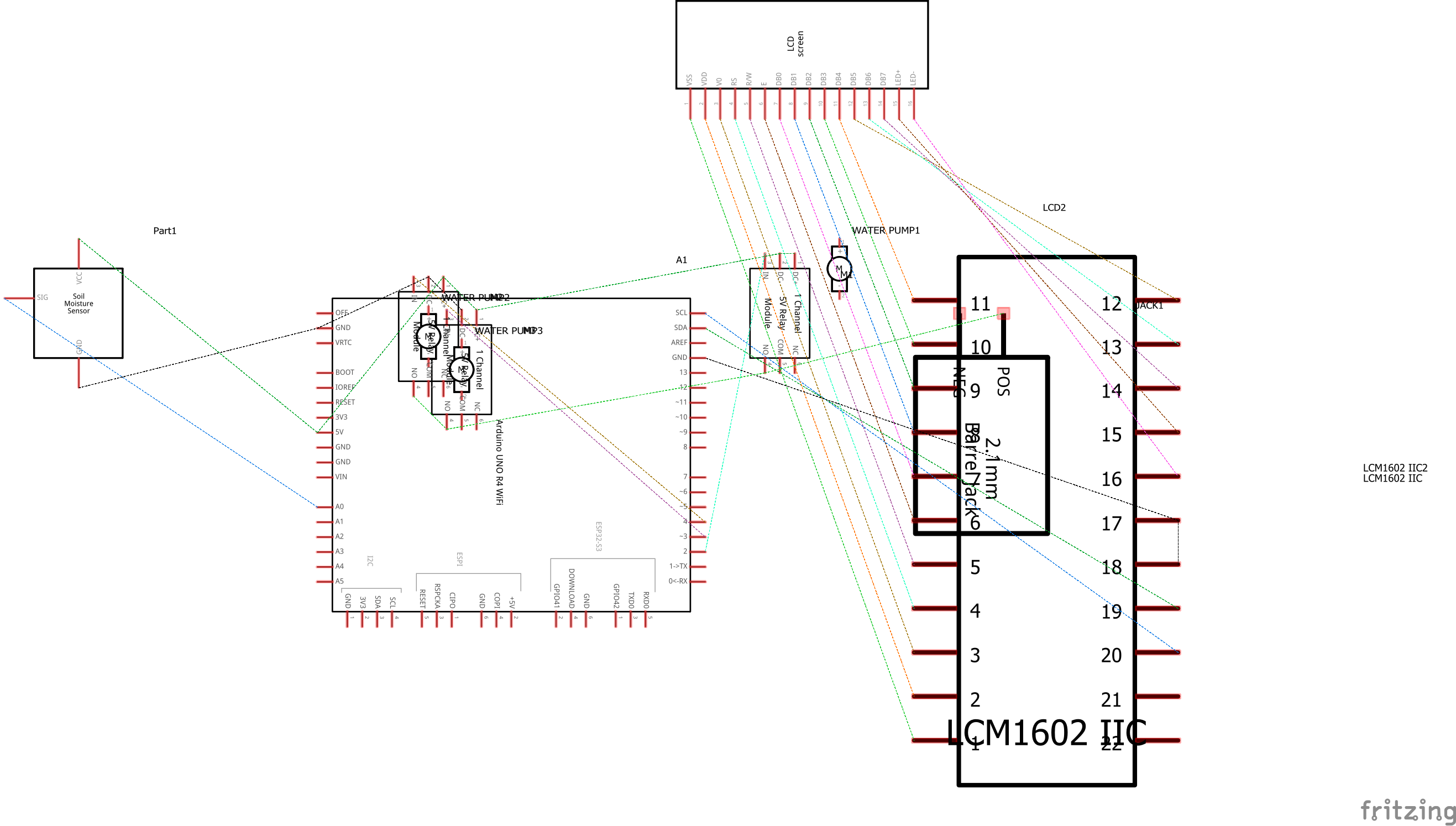
The schematic diagram provides a logical view of the system wiring:
- Arduino UNO R4 WiFi acts as the central controller.
- Soil Moisture Sensor outputs analog values to the Arduino.
- Relay Modules are connected to digital pins on the Arduino. Each relay switches a water pump on/off.
- LCD Display (LCM1602 IIC) communicates via I2C (SDA, SCL).
- Battery Pack / Power Supply delivers power both to the Arduino and to the relays/pumps.
This diagram is useful for understanding signal flow and electrical connections.
2. Wiring / Breadboard Diagram
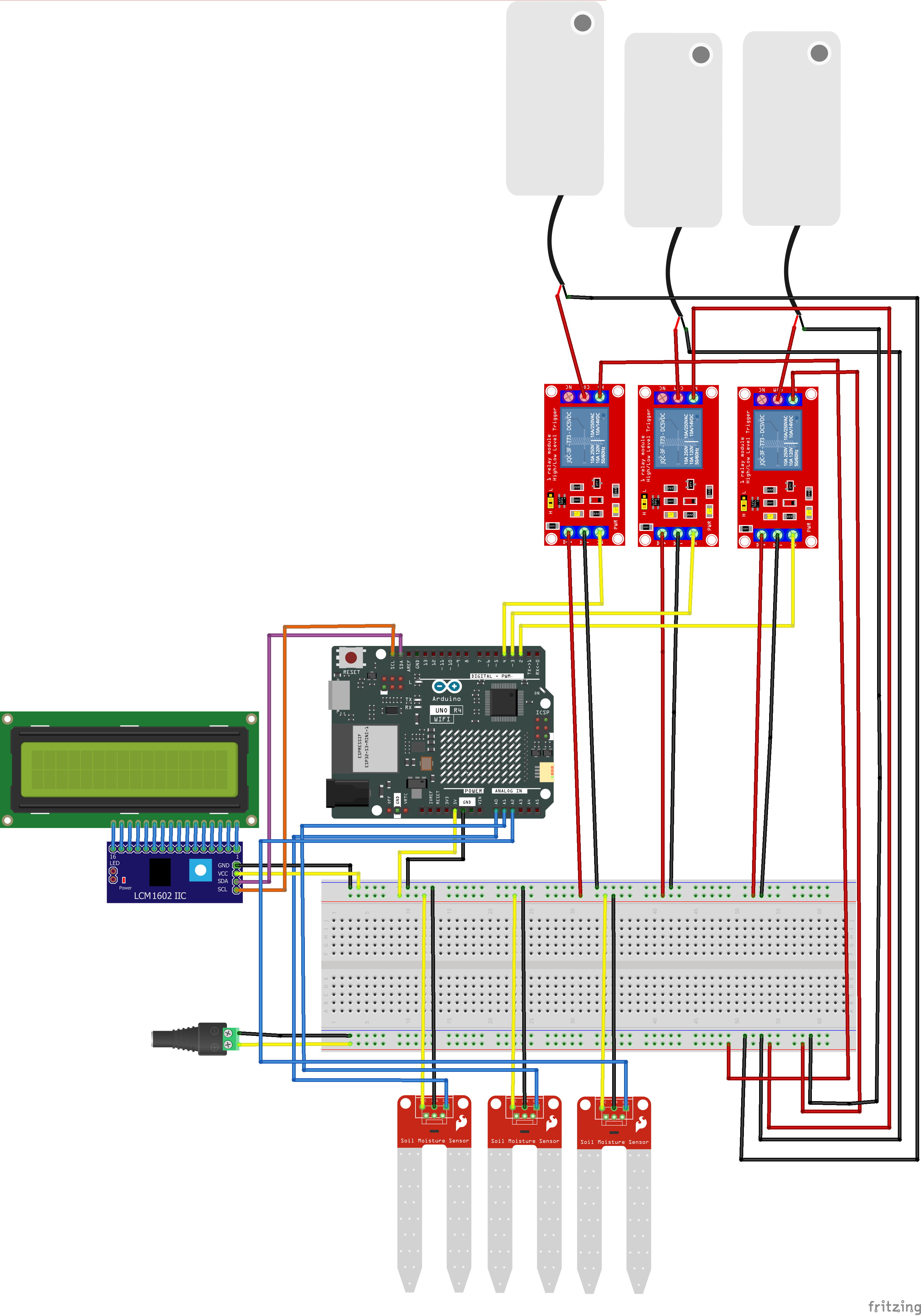
The wiring diagram shows the physical layout of components:
- The Arduino UNO R4 WiFi is mounted on the breadboard.
- Three relay modules are wired to the Arduino and each controls a dedicated water pump.
- Water pumps are powered by the external supply and switched via the relays.
- The Soil Moisture Sensor connects directly to the Arduino analog input.
- The LCD with I2C adapter is connected to Arduino’s SDA/SCL pins for display output.
- Power wiring is routed carefully: the Arduino receives regulated voltage, while pumps draw from the higher-power supply.
This view is more practical for hands-on assembly, showing how wires and modules are physically arranged.
💻 Web Interface
The final system is fully controlled through a browser-based dashboard. It shows pump states, sensor readings, and allows me to manually start/stop pumps.
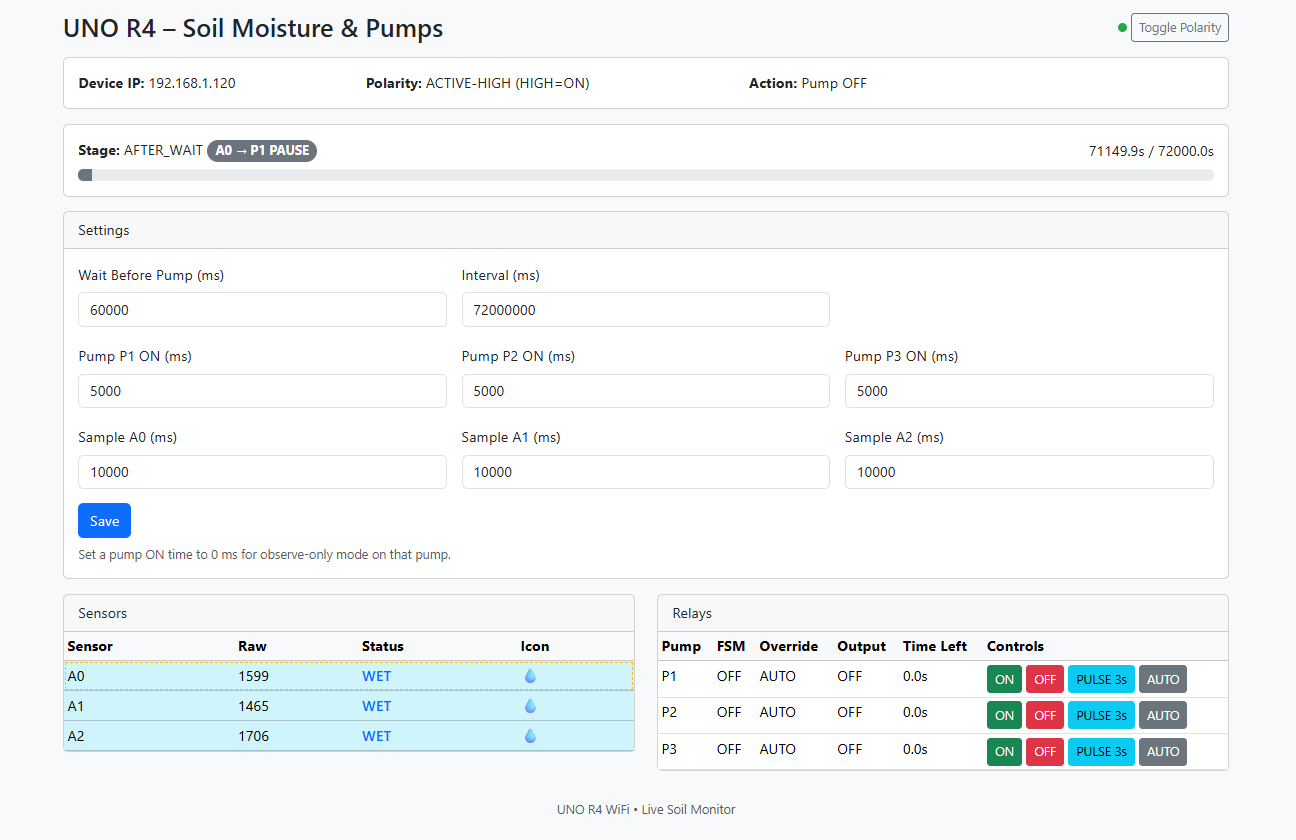
The interface displays sensor values in real time, whether soil is wet/dry, and lets me override or pulse pumps on demand.
🧪 Pump Test Loop
I validated the relays and pumps with a debug loop to ensure each one runs properly.
🌊 Continuous Operation
A second test shows the pumps operating in sequence, moving water as expected through the tubing and into the soil containers.
✅ Conclusion
The self-watering system is now fully functional. Pumps activate only when needed, sensors provide reliable soil feedback, and the arduino web server gives me control and visibility at all times.
The schematic helps clarify the electronic design, while the wiring diagram makes physical assembly straightforward. Together, they form the foundation for both troubleshooting and extending the project.
This has been a fun and challenging build — and now my plants can thrive even when I’m away.
Comments
Comments
Loading comments…